Interior design · 10 sec · English
The Complete Picture ↗The companion forcomics.creators.
Write in your own voice. Shape a joke, rehearse your set, film yourself or make a Personal Double reel. Then bring what the room taught you back to the page.
Get started
Get the app
See how it works
Download on the App StoreiPhone, iPad and Apple Watch
Download on the Mac App StoreMac · one subscription for every device
Have an account? Log in
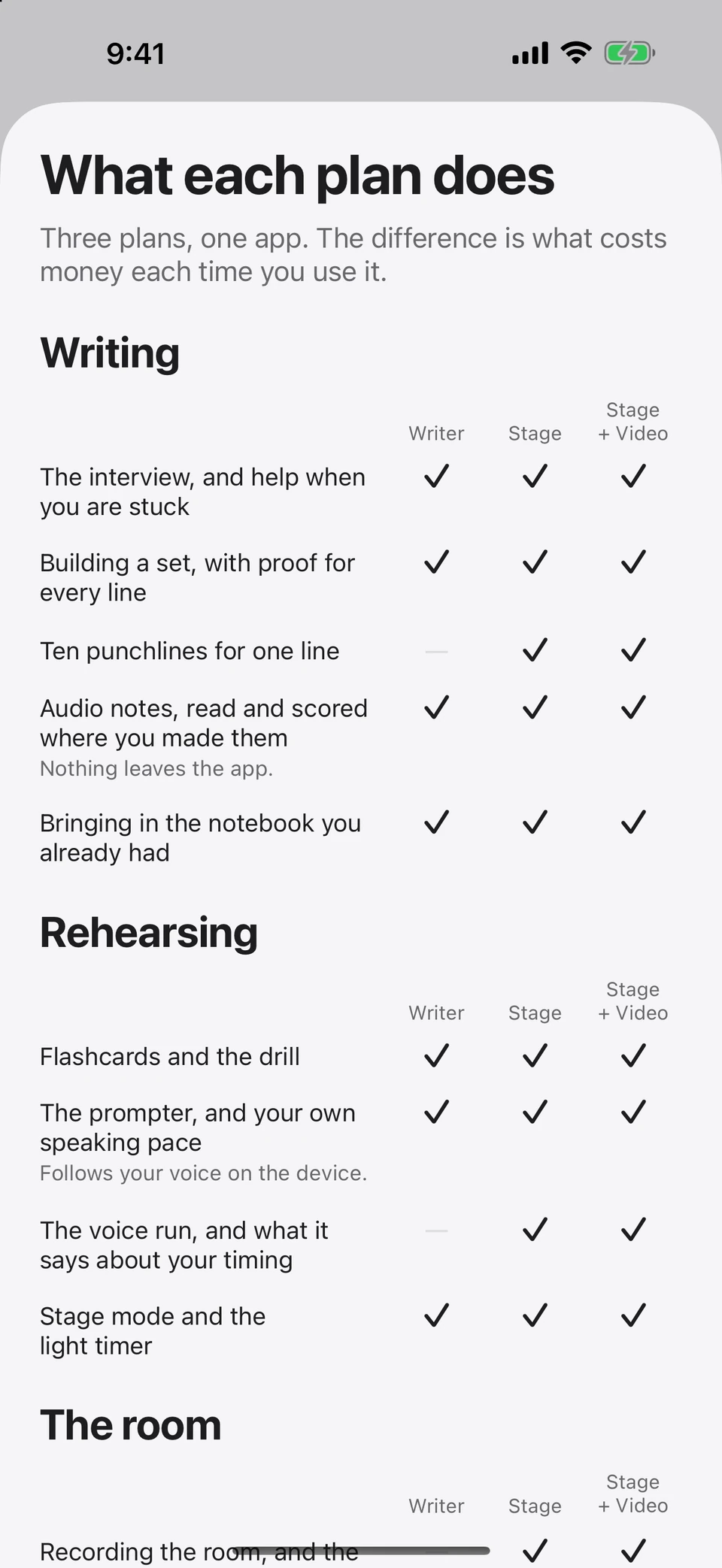
iPhone, iPad, Mac and Apple Watch, one subscription. Three plans, priced by Apple in your own currency — see what each one does. Private iCloud sync and optional online creation have separate privacy paths.
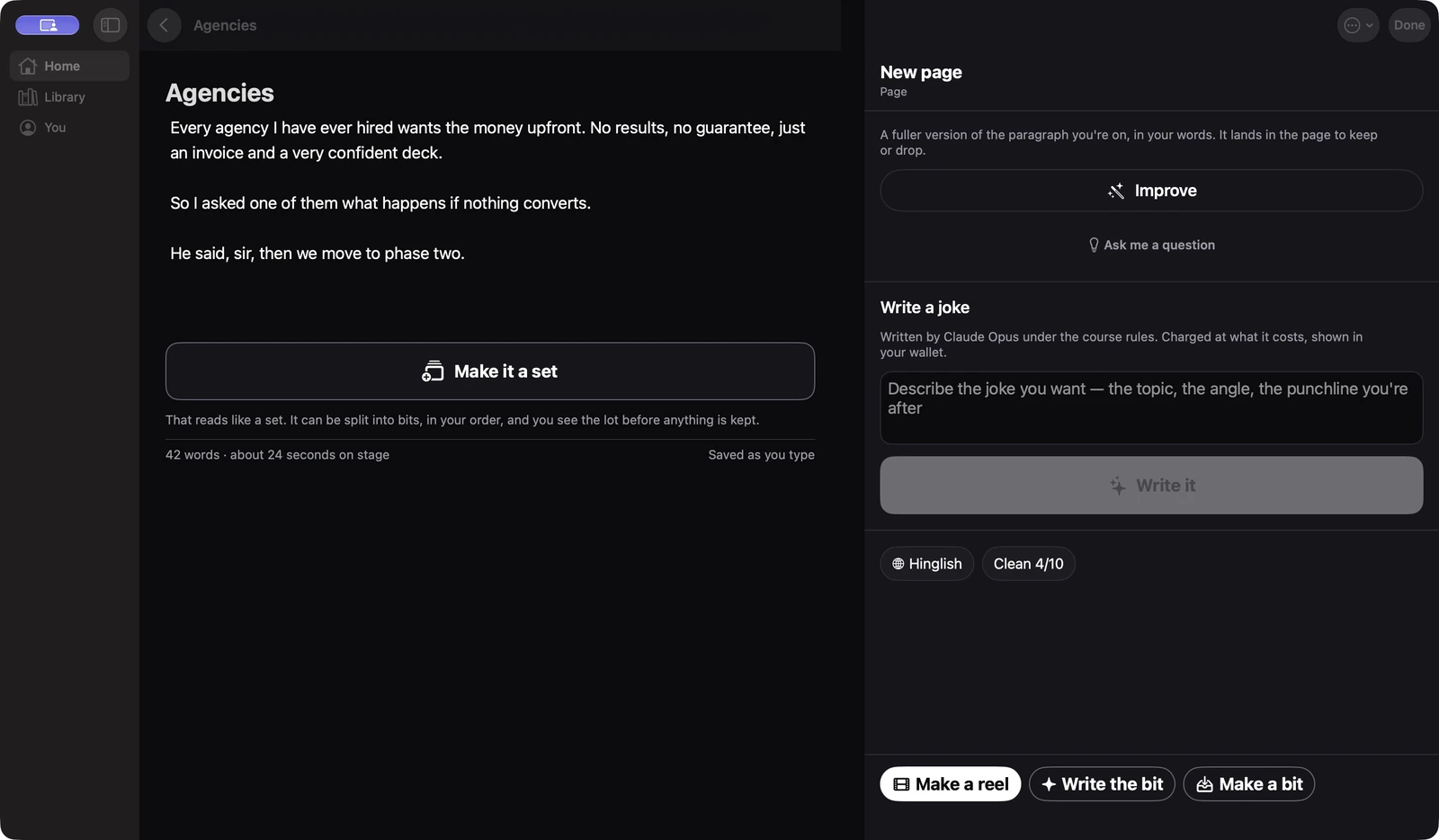
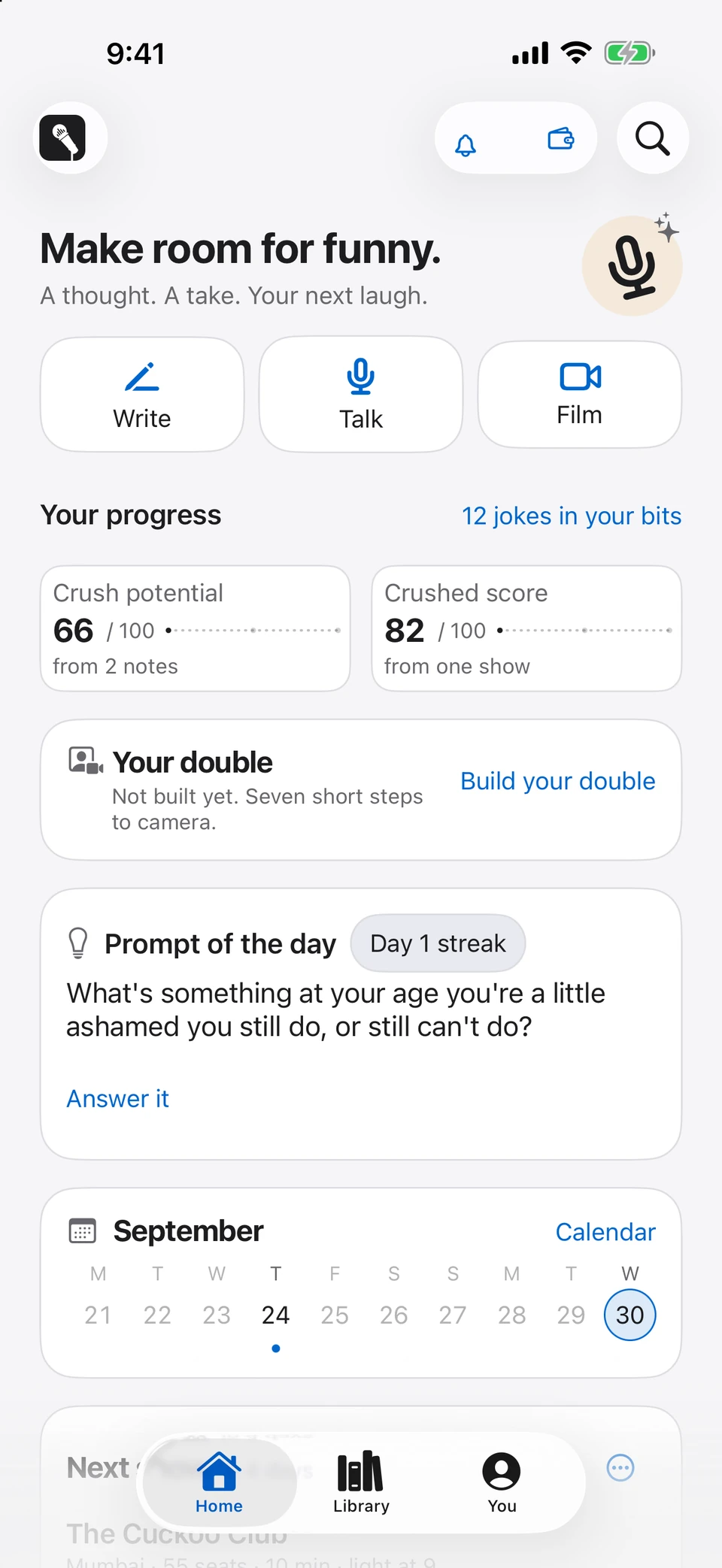
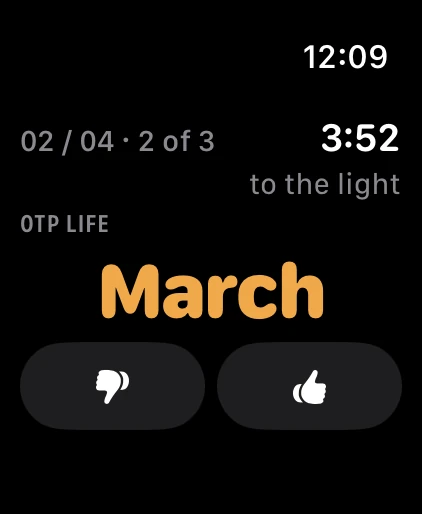
Native development-build screens, captured 30 September 2026 with sample material: Mac Writing Room, iPhone Home and the Watch companion.
Proof · made by my video double
My double did my set. Nothing here was filmed.
I wrote it, made every shot with my video double, and never left the couch. The club, the crowd, the heckler and both of me on stage: all generated from a short clip of me that I recorded and approved.
Every frame is AI-generated. 62 seconds, one take of each shot, cut together by hand.
AI · made with my video double
From the mic to your feedDating in your 40s.
Dating in your 40s.
What could go wrong?
A little baggage. A lot of material. Watch Sachin’s set, one bite at a time.
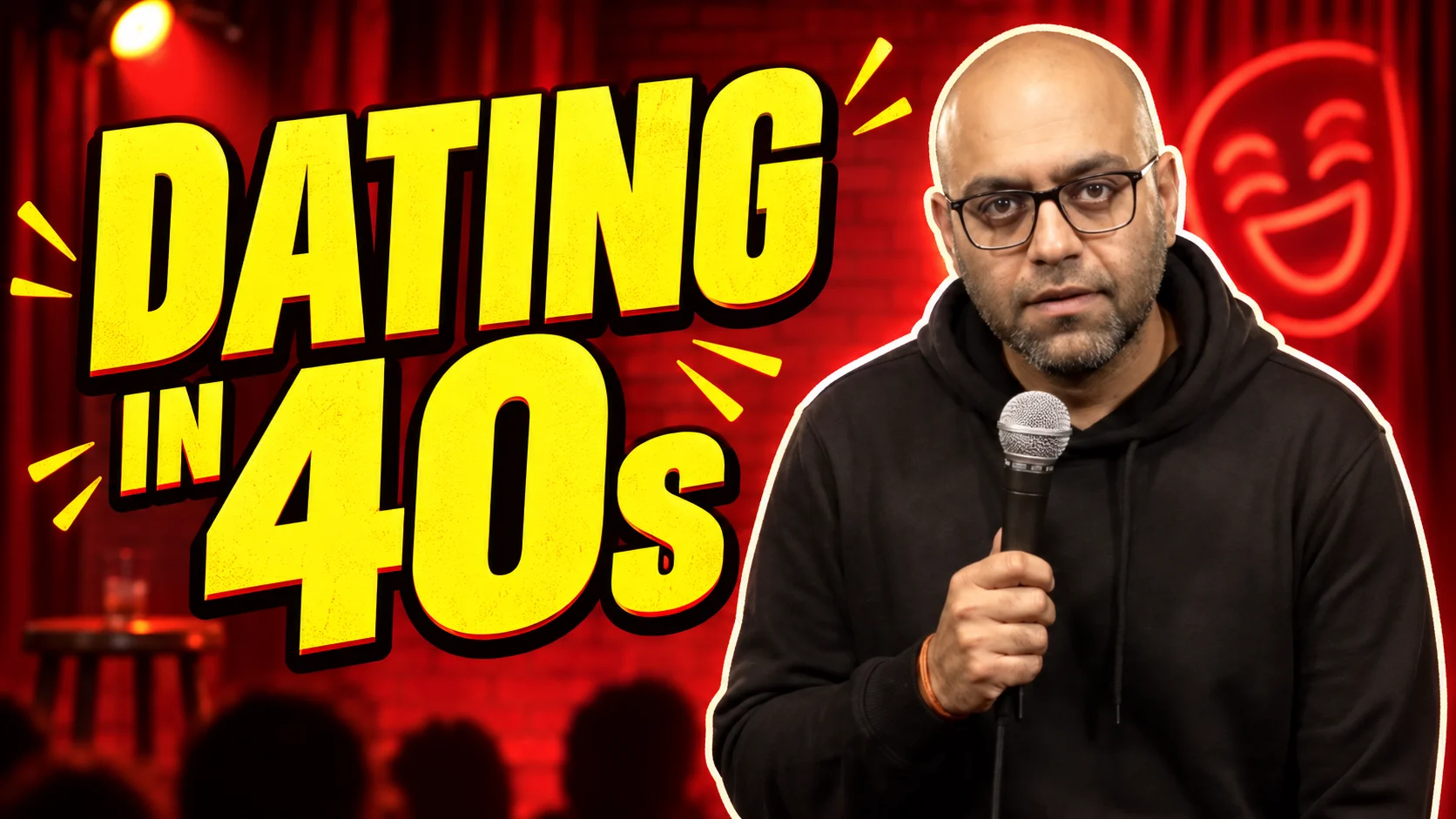 Play full video · 2:55
Pick a part. Keep watching.
 ▶Part 01Dating in 40s
 ▶Part 02Dating in 40s
 ▶Part 03Dating in 40s
 ▶Part 04Dating in 40s
 ▶Part 05Dating in 40s
 ▶Part 06Dating in 40s
 ▶Part 07Dating in 40s
 ▶Part 08Dating in 40s
 ▶Part 09Dating in 40s
 ▶Part 10Dating in 40s
 ▶Part 11Dating in 40s
 ▶Part 12Dating in 40s
 ▶Part 13Dating in 40s
 ▶Part 14Dating in 40s
 ▶Part 15Dating in 40s
 ▶Part 16Dating in 40s
 ▶Part 17Dating in 40s
 ▶Part 18Dating in 40s
 ▶Part 19Dating in 40s
 ▶Part 20Dating in 40s
 ▶Part 21Dating in 40s
CRUSHEDWITHIT STUDIO
Your expertise. Your personality.
On video.
Start with a sample. We make it yours with your approved likeness, voice and script.
Professional videos
Explain what you do. Make your expertise memorable.
Legal services · 10 sec · English
Before You Begin ↗Entrepreneur · 10 sec · English
The Story So Far ↗Professionals after hours
Your profession. Your inside jokes. Your moment on stage.
Lawyers · 10 sec · Hinglish
The small question ↗Doctors · 10 sec · Hinglish
The second opinion ↗Entrepreneurs & solopreneurs · 10 sec · Hinglish
Every job, except paid ↗Fictional AI-generated sample performers. Explore the collections, choose a format and discuss your own version with Studio.
Inside the app · current development build, captured 30 September 2026. Real native screens with sample material. Select a view or open a screenshot full size.
00 · Start
Make room for funny.
Write, Talk and Film start from Home. Keep your progress, your double, your calendar and unfinished work close by. Your Library brings notes, bits, sets, shows and reels into one searchable feed.
Native iPhone Home · sample material.
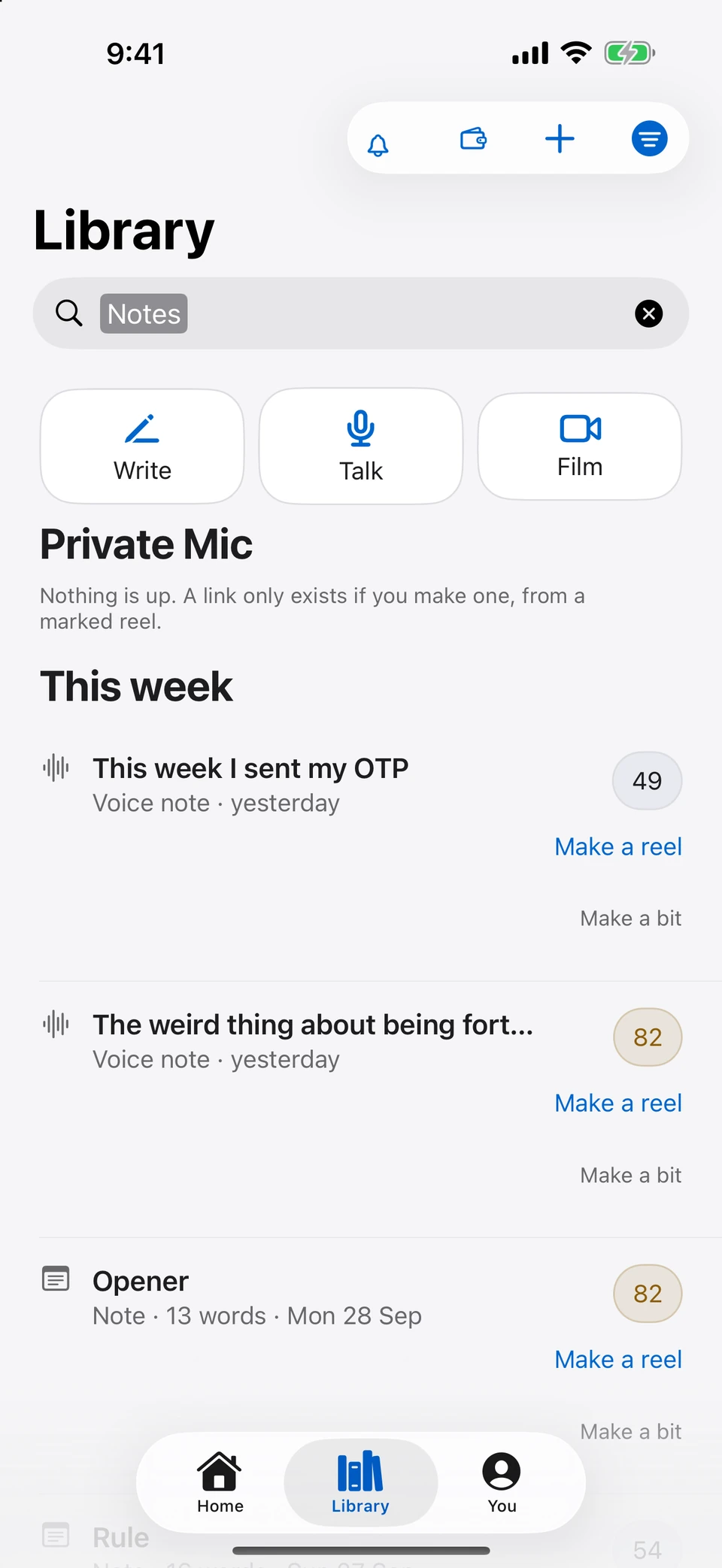
The current Library feed, filtered to Notes · sample material.
01 · Write
Your page. A little help beside it.
Start with a thought, a script or a question. Keep writing on one editable page. Ask me a question gets you unstuck; Improve helps shape what you have; Write a joke starts from a brief you choose.
Your words save as you type. Make them a bit, a set or the script for a reel when you are ready.
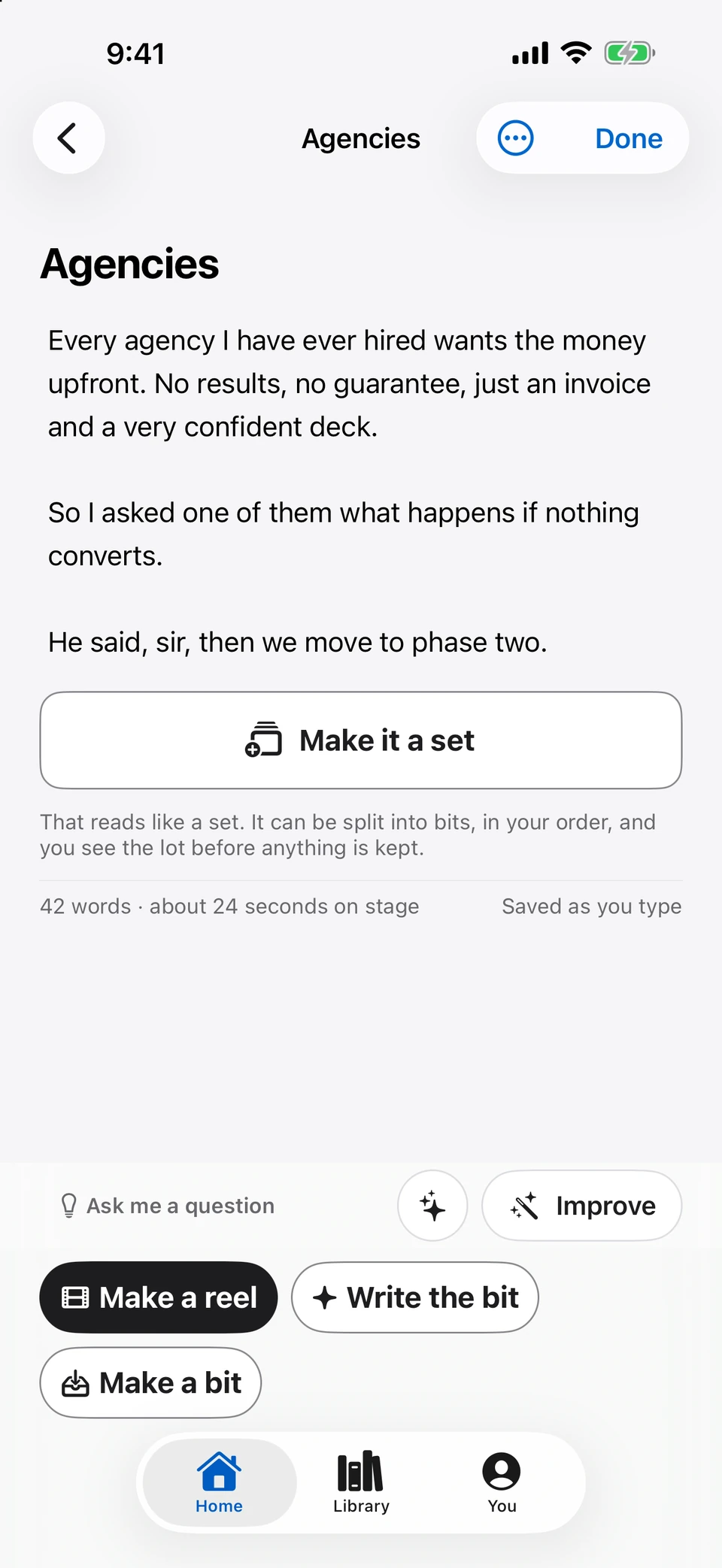
The editable Writing Room with its current actions · sample page.
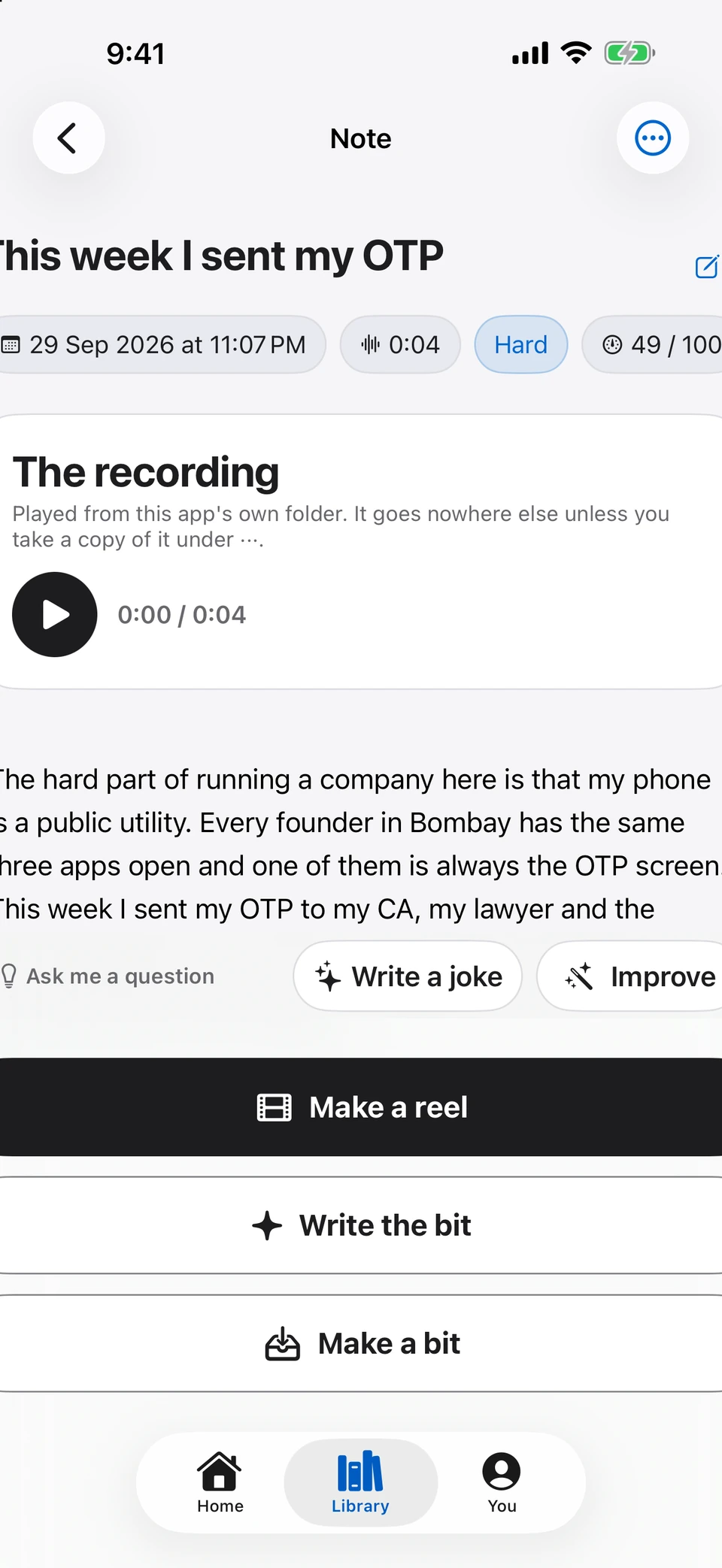
A saved voice note opens with its recording and transcript · sample material.
02 · Reason
See why a line might land.
A generated line carries its reasoning: the mechanism, the assumption, the connector and the reveal. Review the explanation and the punch-word check, then choose what belongs in your set.
Reorder your bits in the set editor. Keep the running order and the reasoning together.
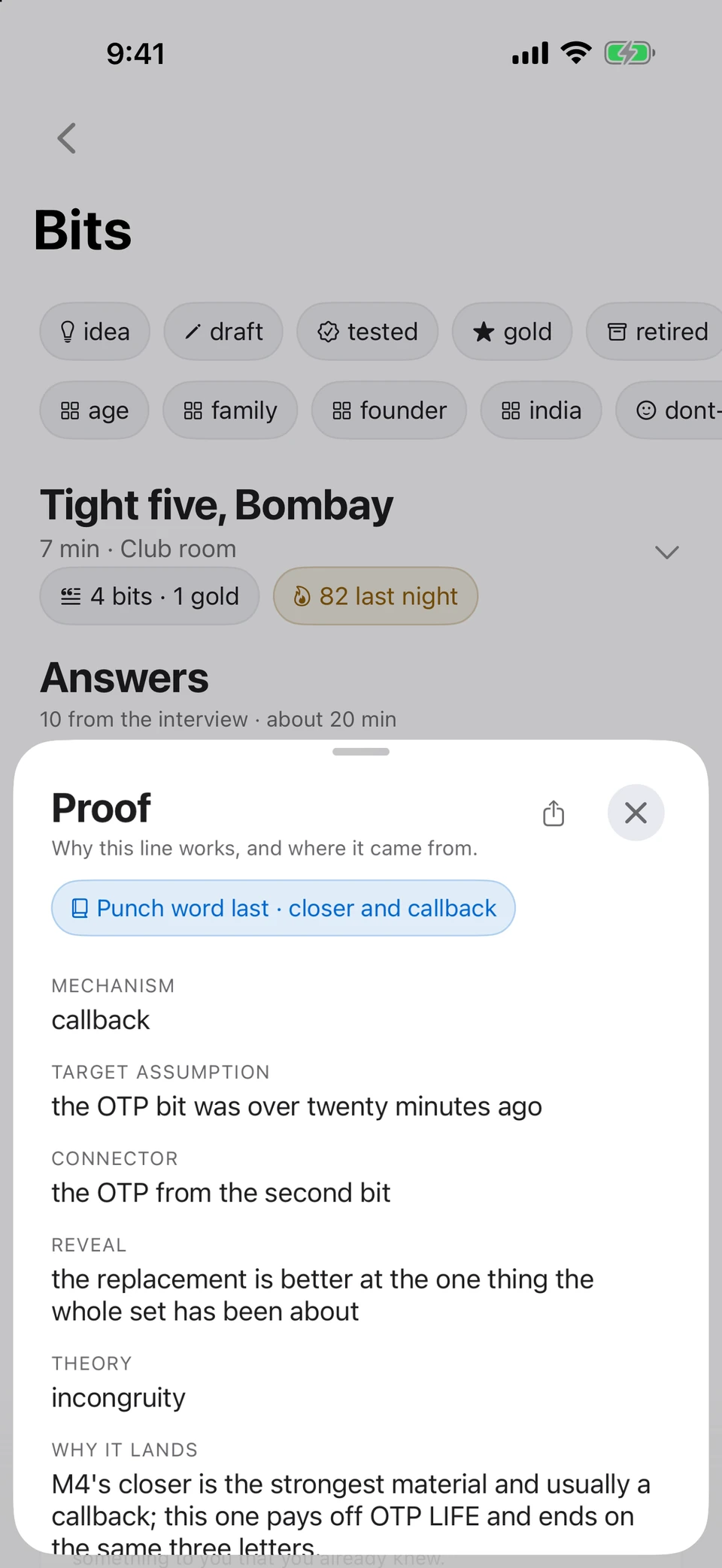
The native Proof sheet explains a callback · sample generated line.
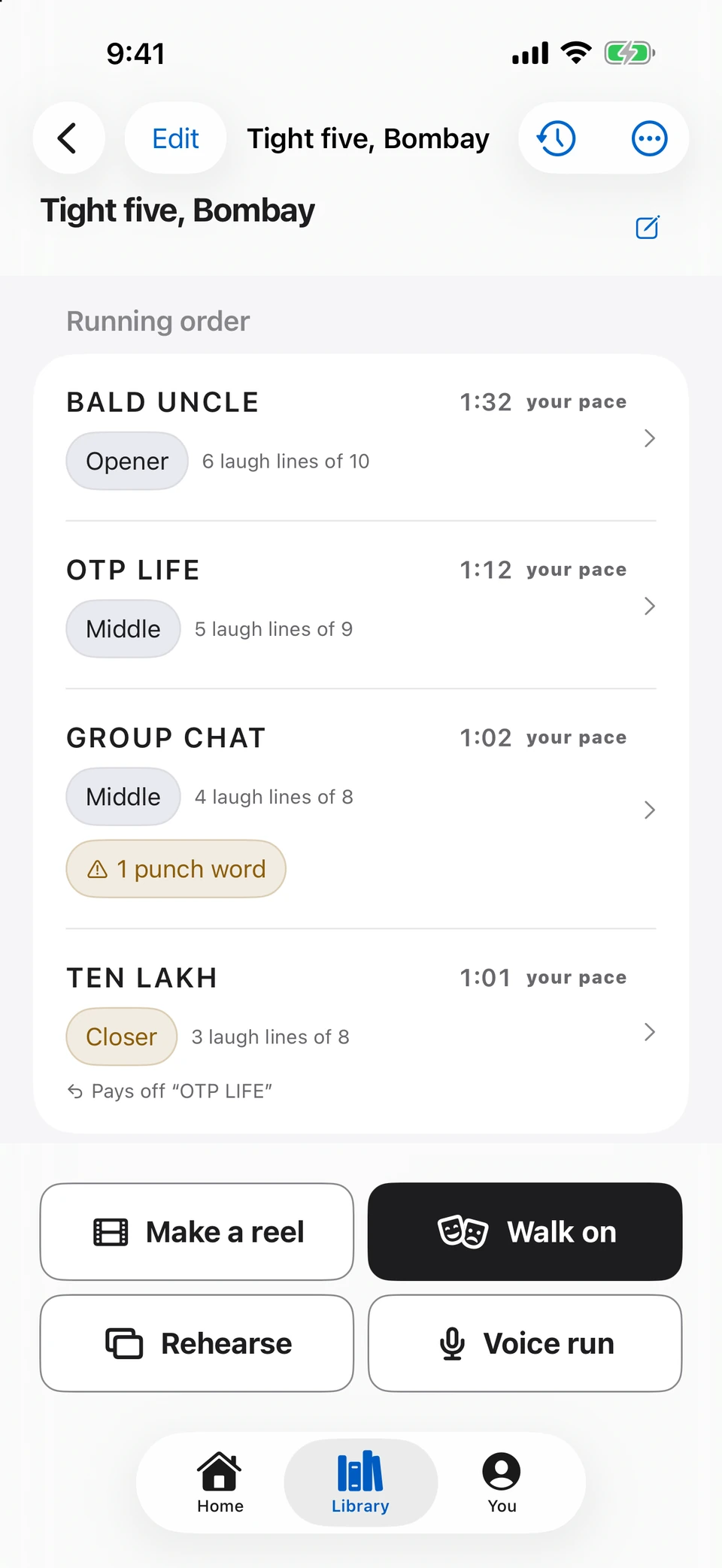
The current set editor with opener, middle and closer · sample set.
03 · Notes
Catch the thought. Keep your voice.
Tap Talk, then review the transcript. On-device analysis can find a premise, suggest an attitude and break down Crush Potential. Edit what was heard and choose what to develop next.
Transcription depends on the language and capabilities available on your device. Sample scores here illustrate the interface.
Recording, transcript and writing actions on the native note page · sample note.
Search and filter the current Library · sample notes.
04 · Rehearse
Say it. Reveal it. Mark it yourself.
Flashcards have two steps: say the line, then Reveal and choose Blank, Fumbled, Shaky, Clean or Instant. Your self-ratings guide what you practise again.
Voice Run is a separate mode. It follows your spoken set, reports missed punch words and holds when you go quiet.
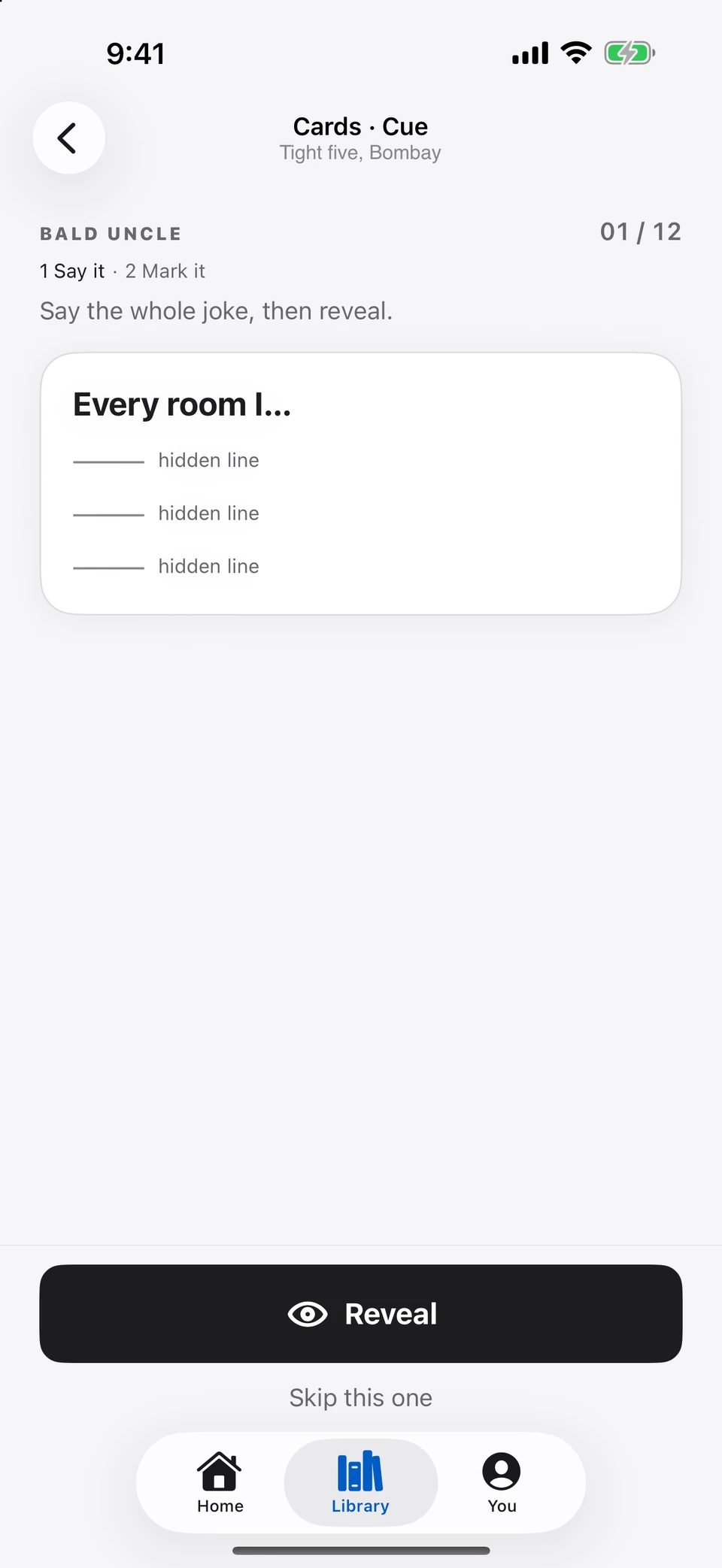
Cue flashcard before Reveal · sample set.
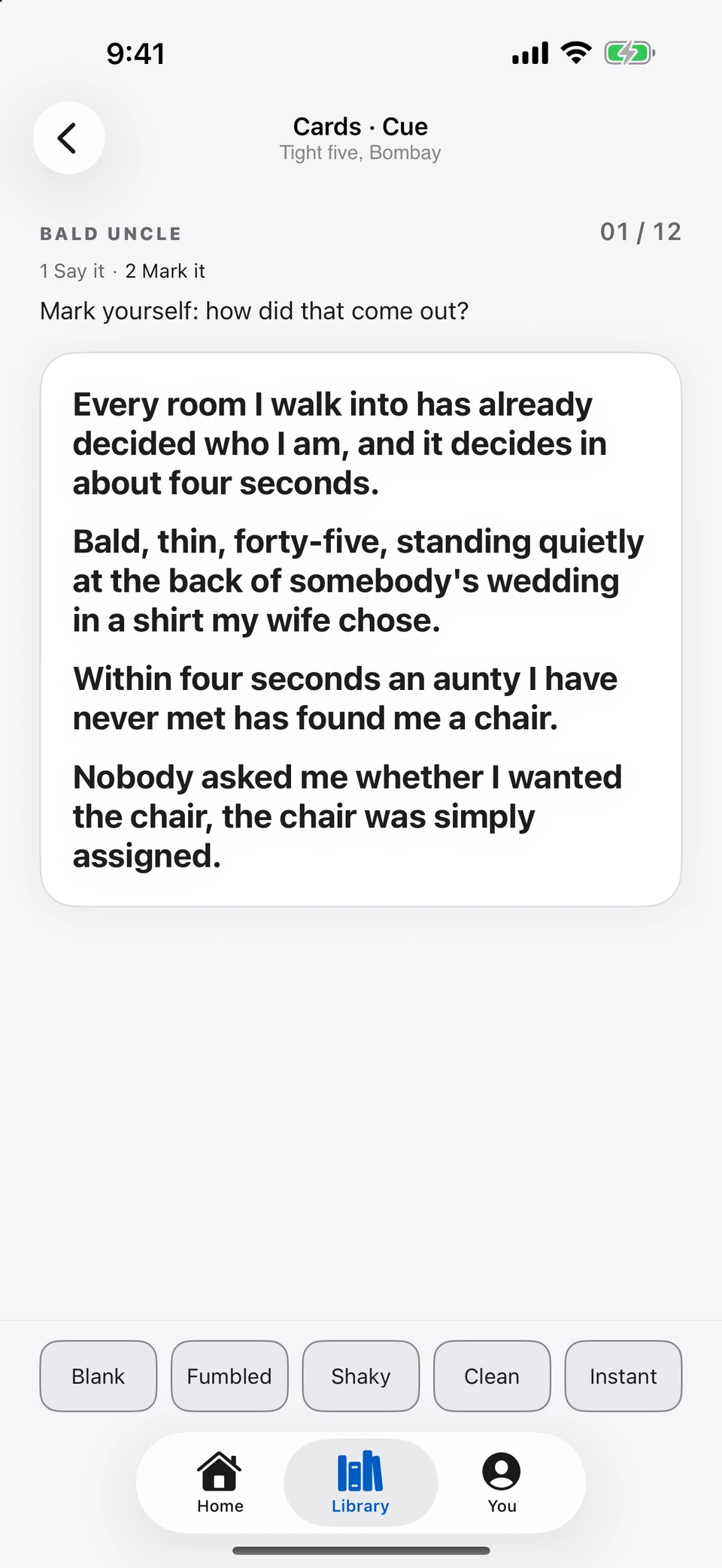
After Reveal: the five self-ratings, exactly as they appear in the app.
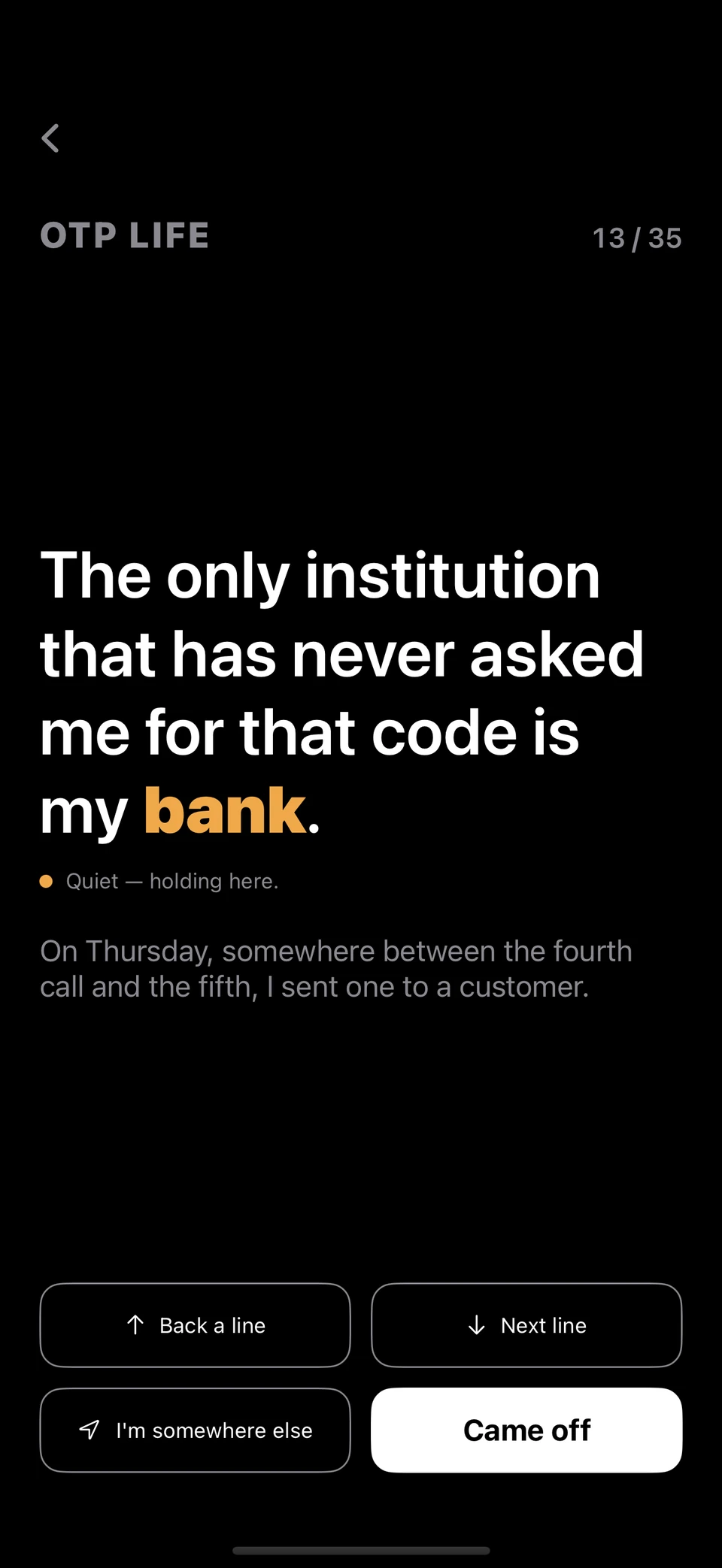
Voice Run follows a demo speech source; this is not a live microphone recording.
05 · Stage
One joke. Your next breath.
Large type on black. The bit title stays above the current joke, punch words stand out, and the light clock stays visible. Swipe on the phone to move one joke.
Thumbs on your phone or Watch record your own view of how it landed. Stage and live show capture run on iPhone and iPad.
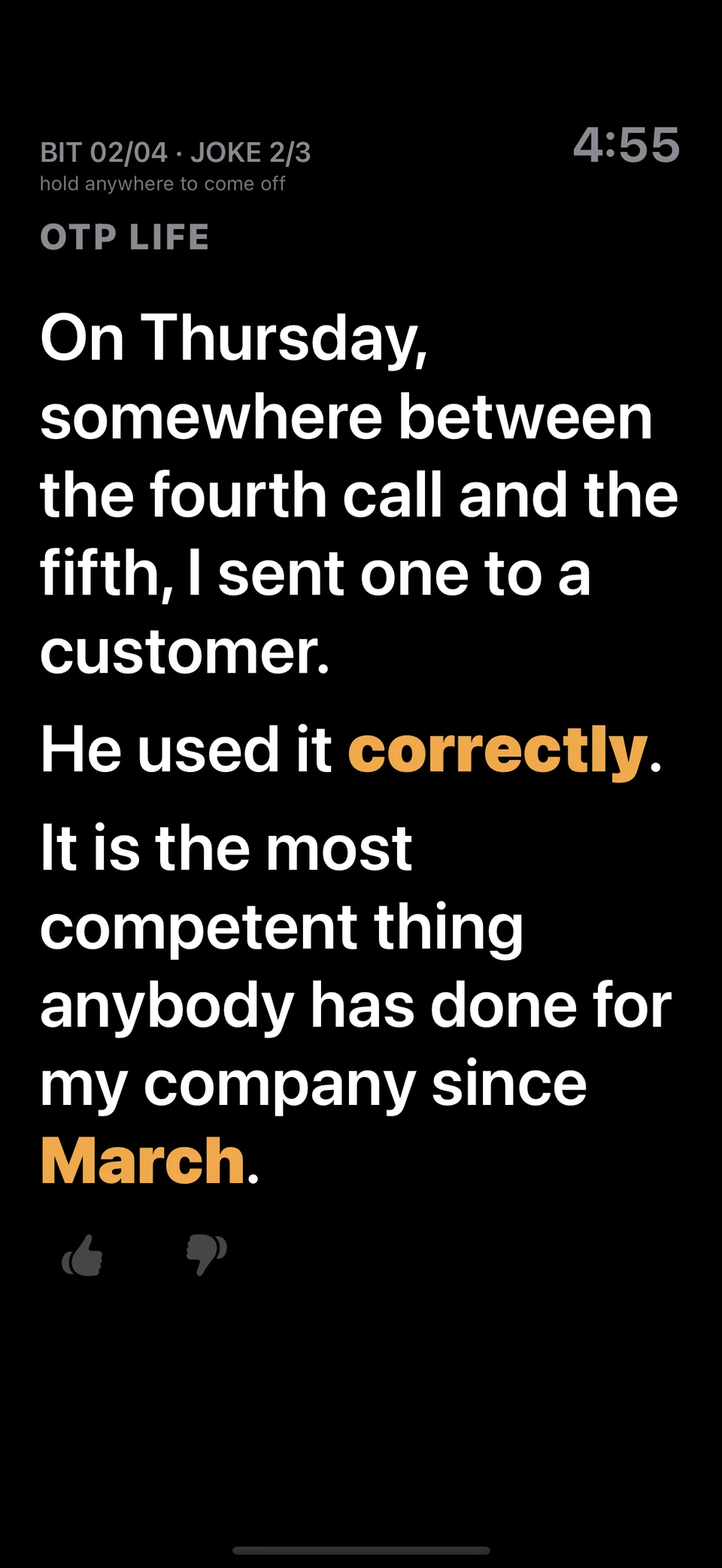
OTP LIFE · bit 2 of 4, joke 2 of 3 · sample set.
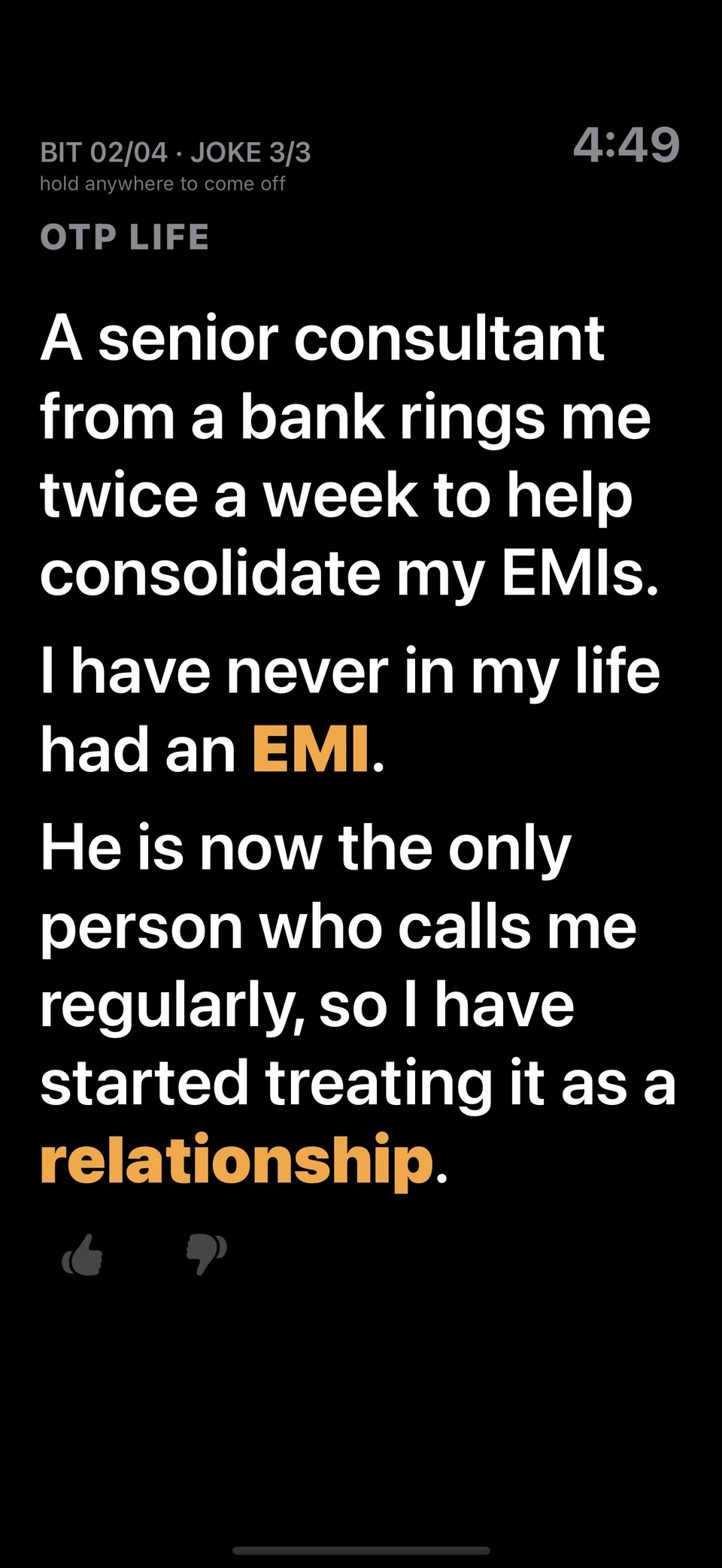
The next joke in the same bit. The counter advances; the bit title stays.
06 · Live
Listen to the room.
Record a show on your iPhone or iPad. On-device analysis follows laughter, surges and quiet moments against your material, building a view you can revisit after the show.
The screen shown here uses a sample room signal. It demonstrates the current controls, not an accuracy benchmark.
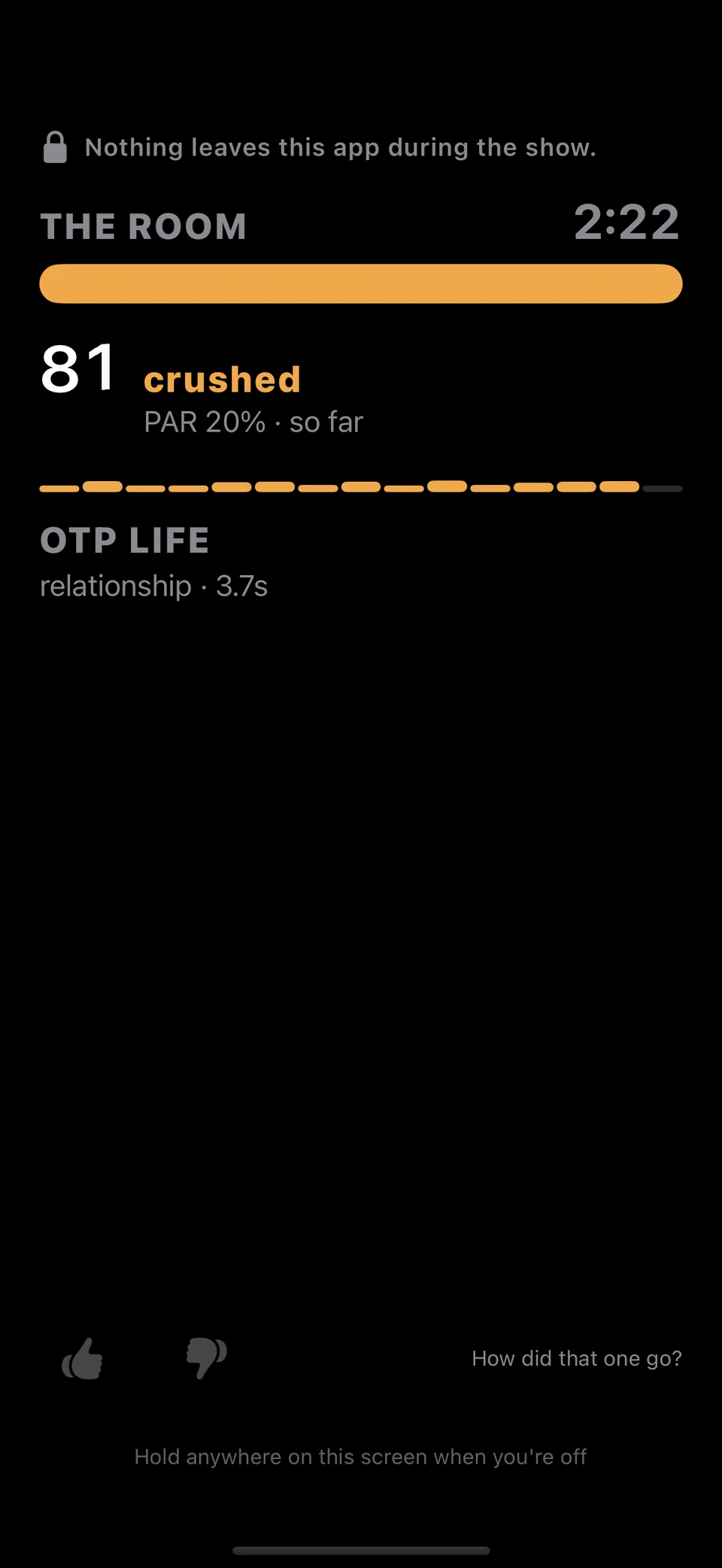
Native Live screen, driven by a demo room signal.
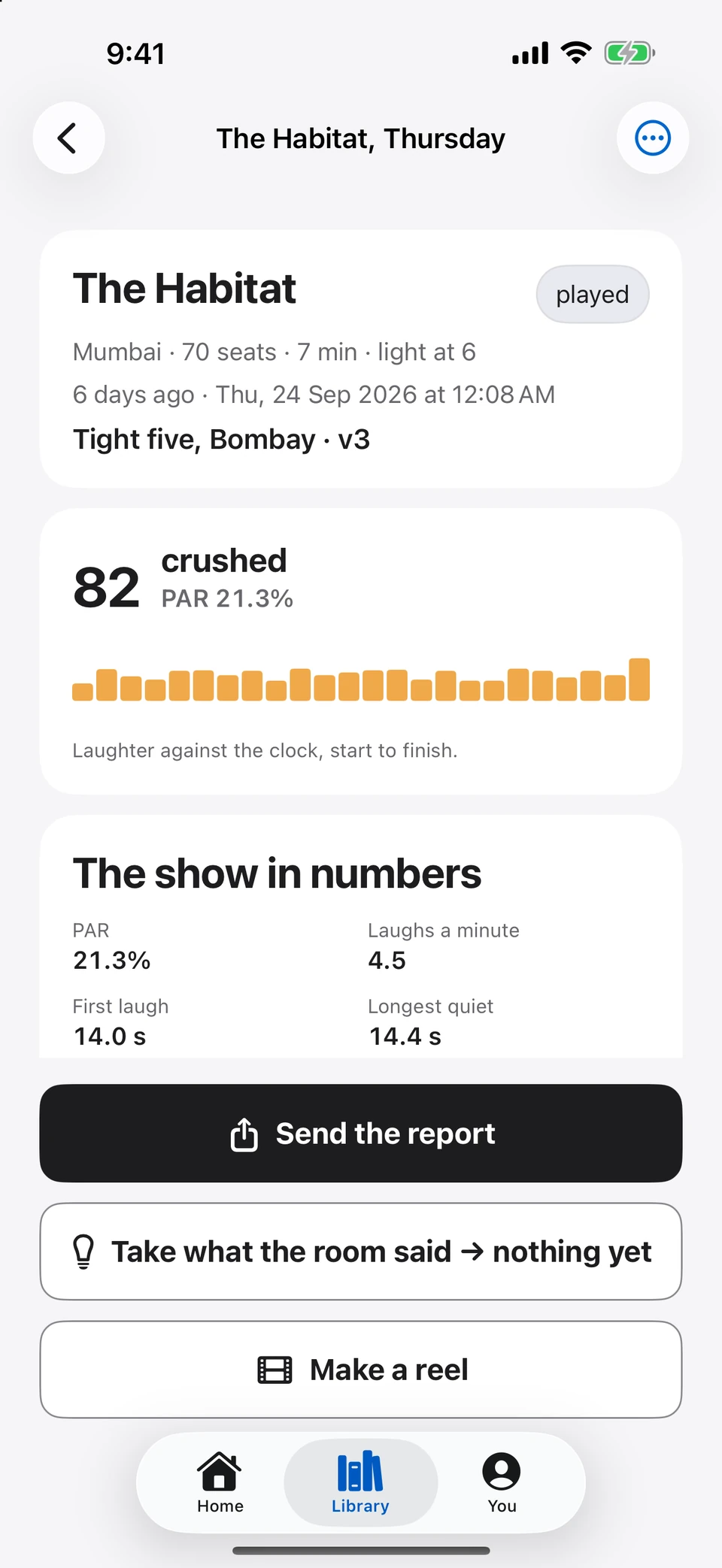
The saved show with its score breakdown and actions · sample performance.
07 · Report
Bring the evidence back to the page.
Open a played show to see its score, laughter share and timeline. The Show Report brings the key moments into a shareable page.
Suggestions are reviewed individually. Accepting a suggestion creates a new version; the app does not silently rewrite your set.
A played show and its measurements · sample performance.
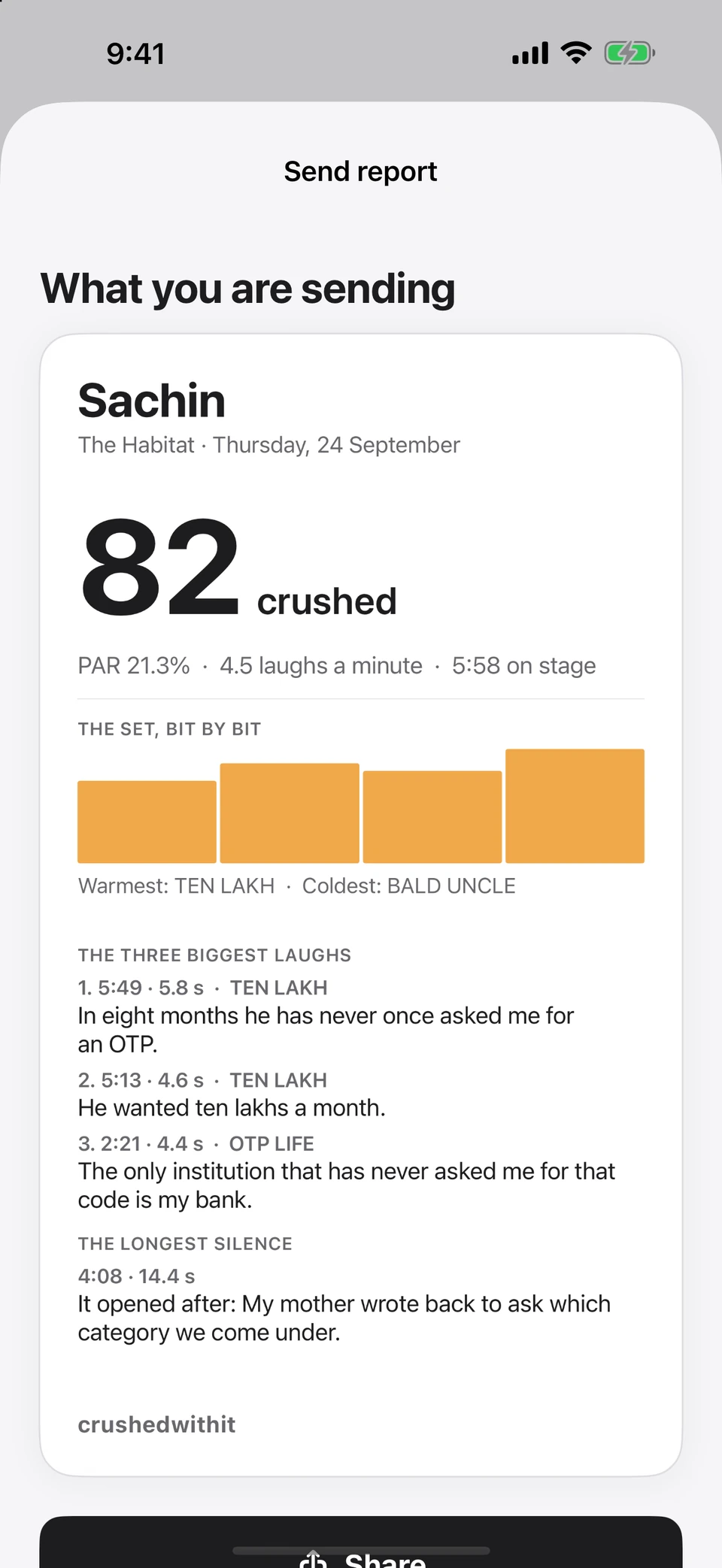
The native report preview, with sample scores and lines.
08 · Film
You, in your own take.
Choose Film yourself to record with the voice-paced prompter. Review saved takes, trim the words you want and export with captions on your device.
Self-filming does not require a double or render credits. Takes stay local; a clip you keep can sync through your private iCloud.
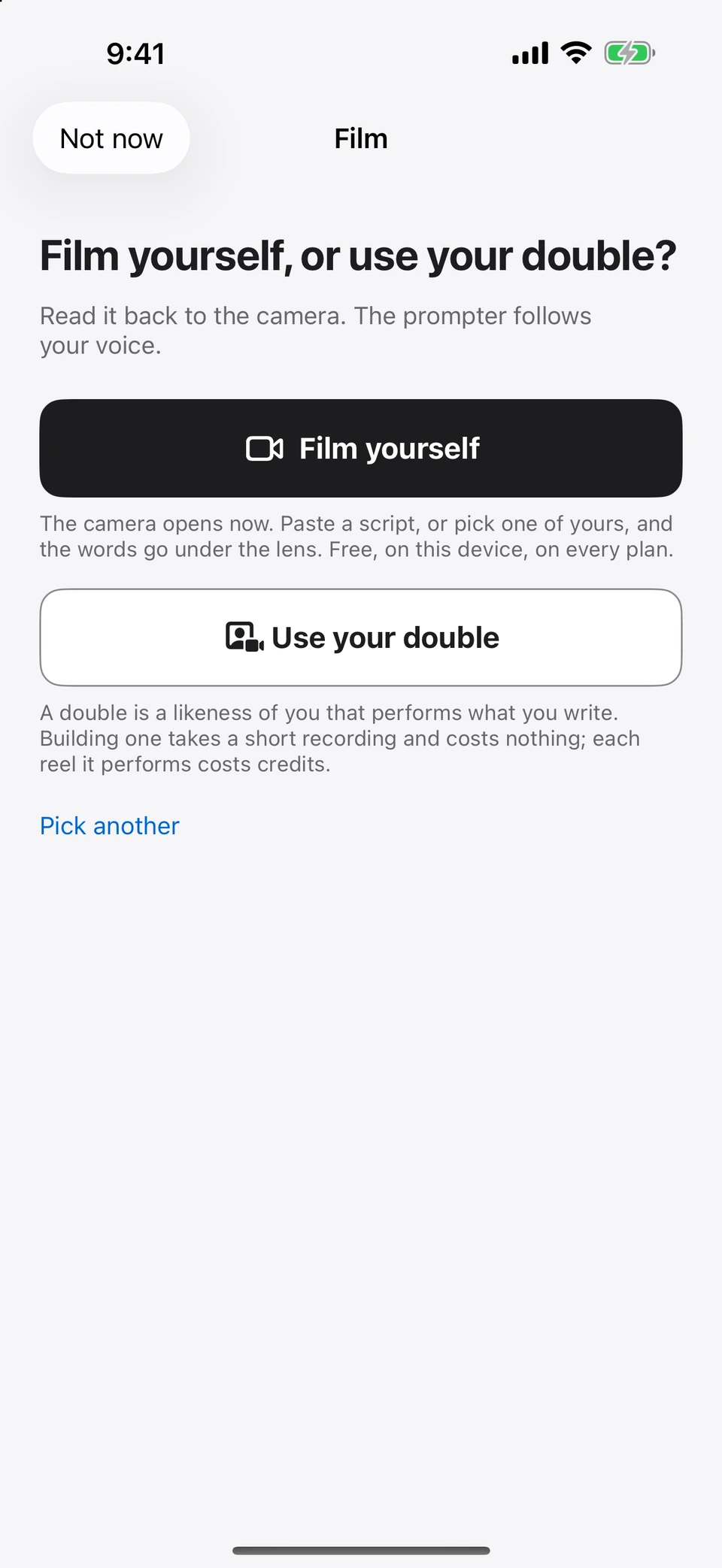
The actual Film entry screen distinguishes self-filming from using a double.
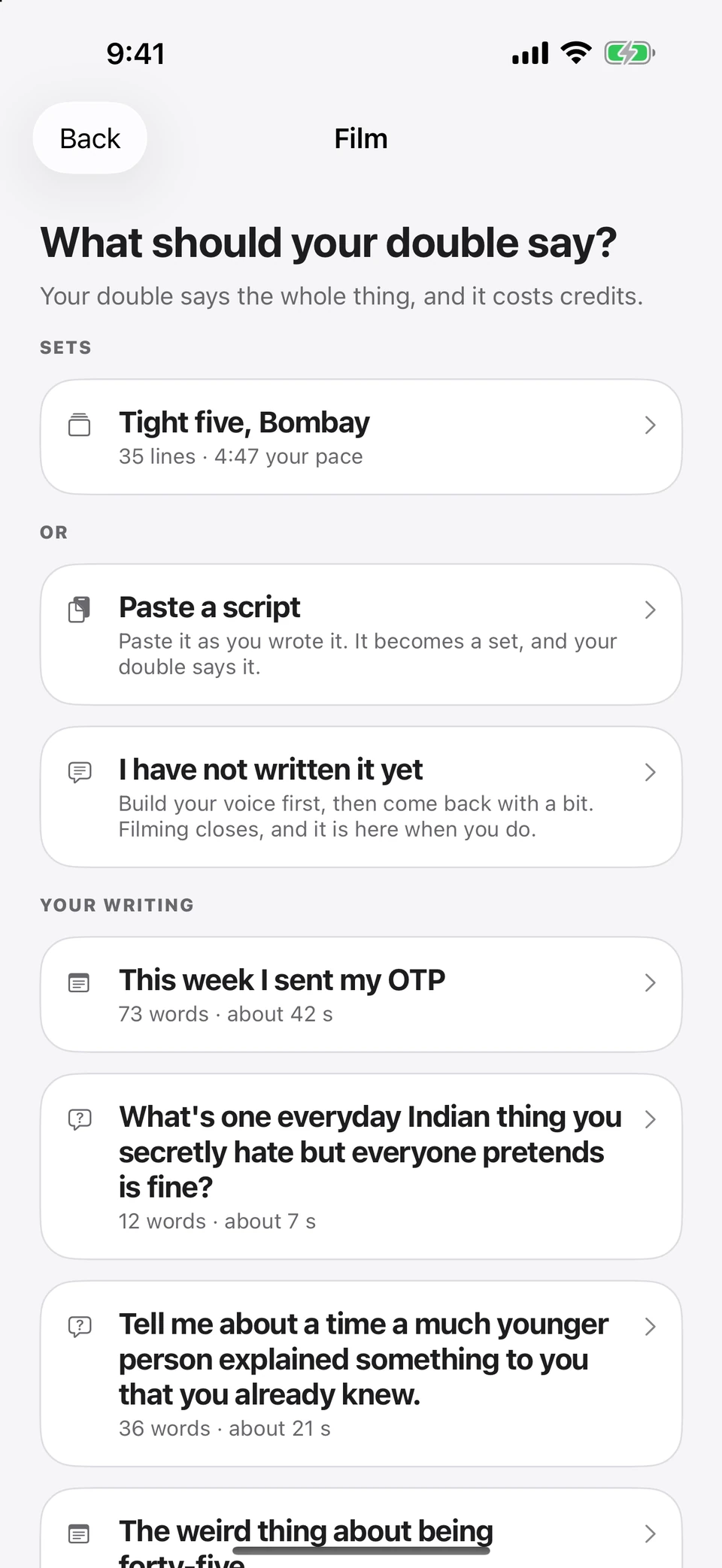
The double’s material picker can use your writing or a pasted script · sample library.
09 · Reels
A longer story. In your own voice.
Watch the proof: a whole set by my double ↑
Use your Personal Double for generated video. Review the words, pronunciation, look and format, then check the quoted cost before rendering.
Long videos are made in connected parts. Watch the whole or a part, fix a part that needs work and compare takes. Keep the parts you like. Pronunciation support and results vary by language and provider.
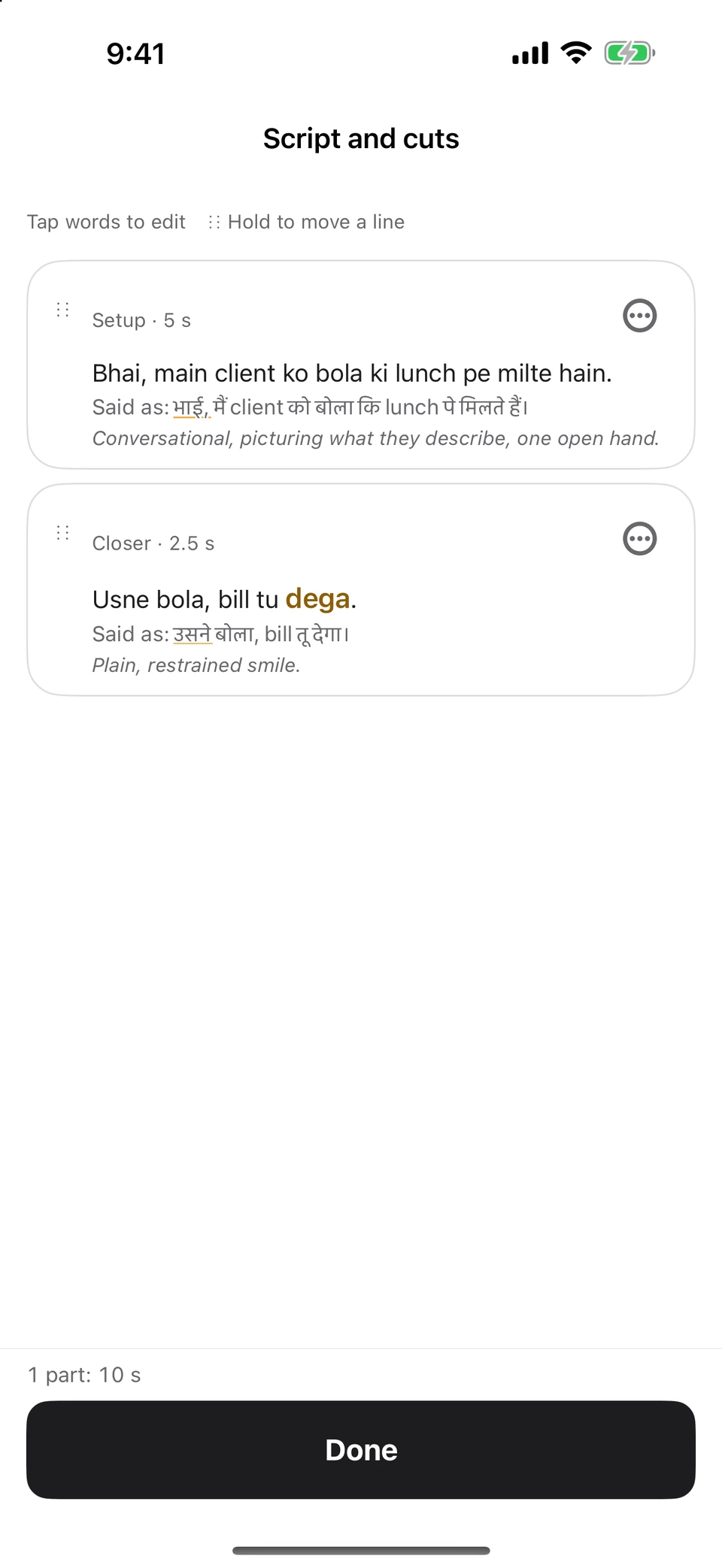
Native script editor: written Hinglish and “Said as” in Devanagari · sample dialogue.
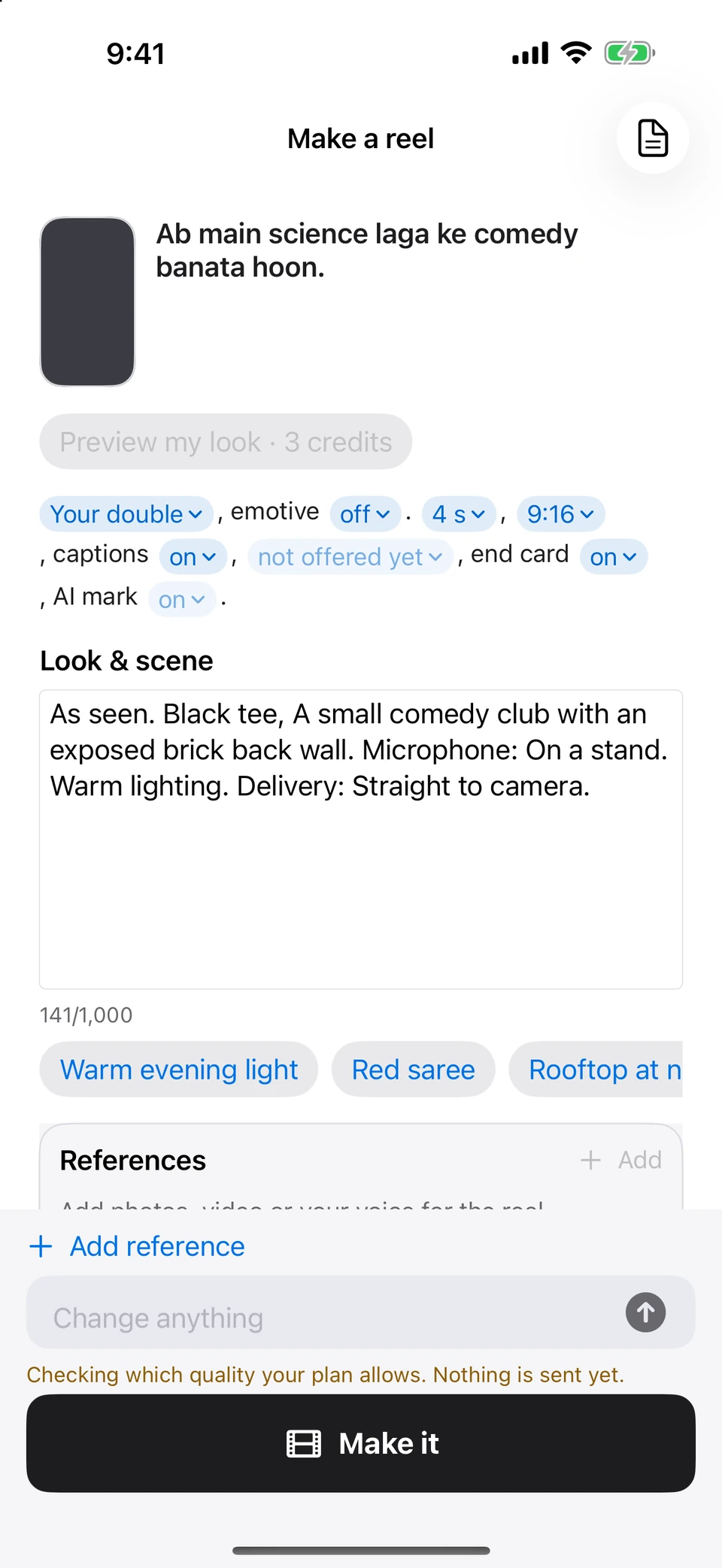
Native reel Review with a sample draft. No video or charge is created by this demonstration.
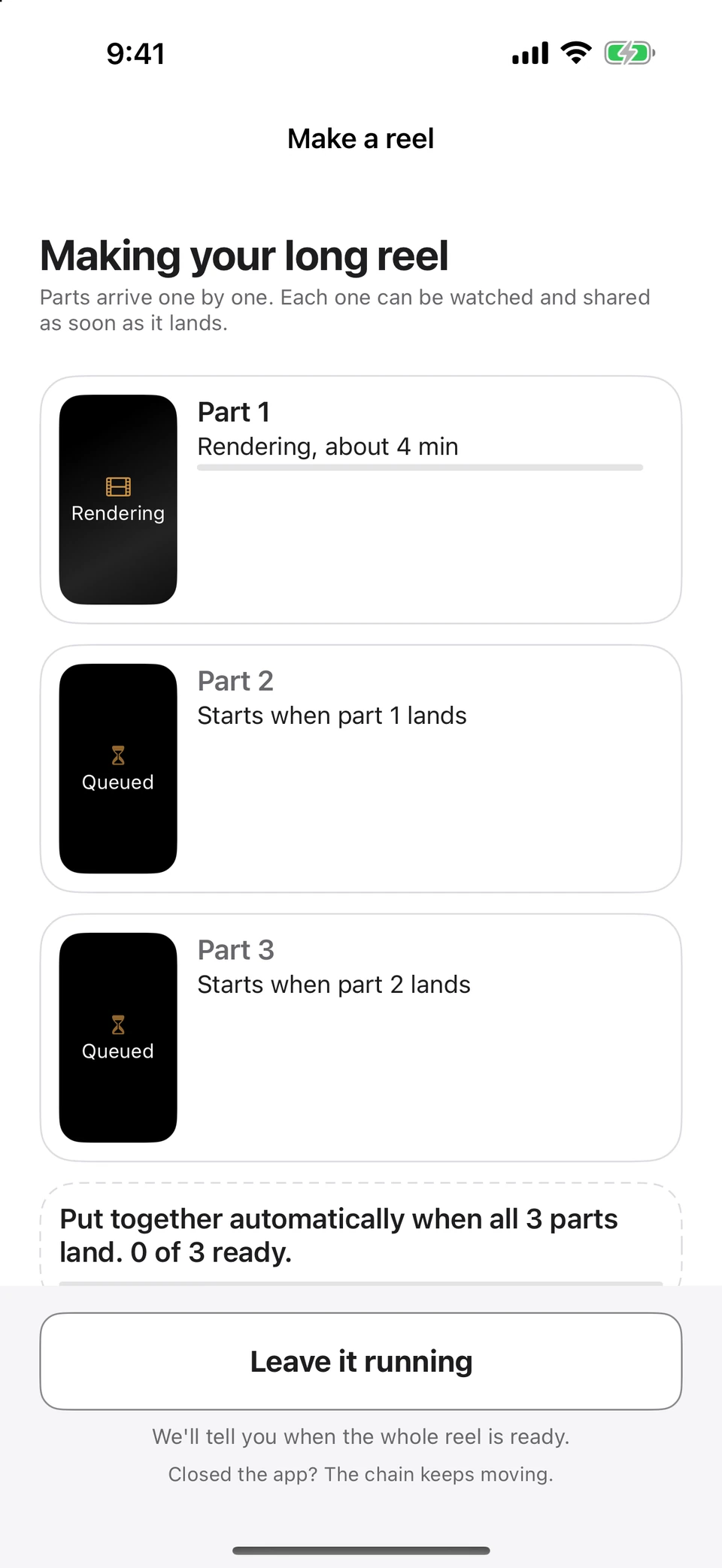
The real long-reel progress screen with three sample parts. Times are illustrative.
One app. Four places to create.
One subscription across iPhone, iPad, Mac and Apple Watch. Each has its own part to play.
Mac
Room to write.
Your Library and page sit beside the actions that belong to them. Write, edit and prepare your material on a larger canvas. Stage and live show capture belong on iPhone and iPad.
Native Mac Writing Room · sample page, dark appearance.
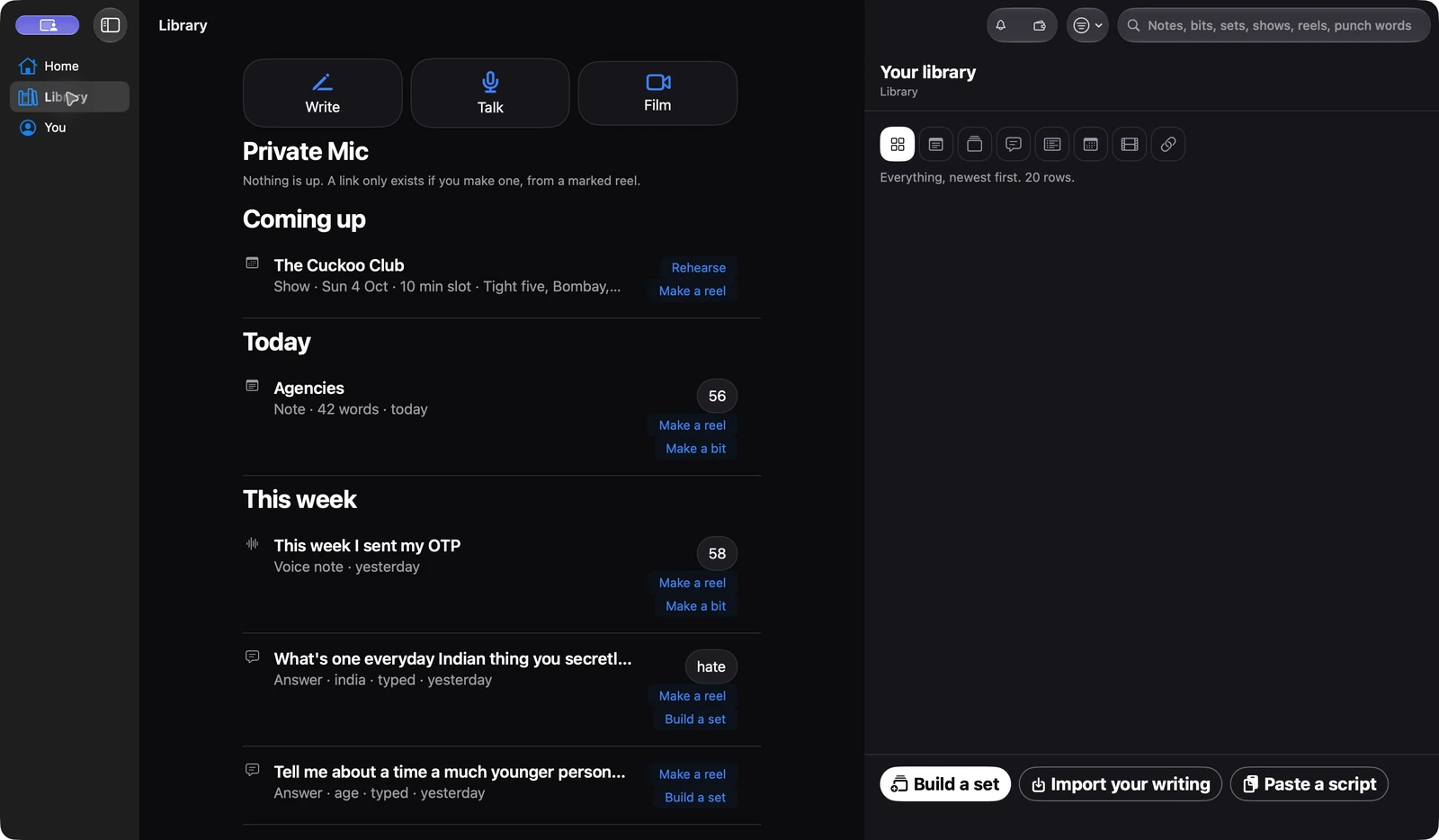
Native Mac Library with filters in its side column · sample material.
iPhone
From pocket to stage.
Catch a note, develop your writing, film a take or walk on with your set. The same three tabs—Home, Library and You—keep the familiar places close.
Native iPhone Home · sample material.
Native iPhone Stage · one joke from a sample set.
iPad
Give the words more room.
A regular-width layout for writing and editing, with navigation and actions beside your page. Use Stage on a stand when it is time to perform.
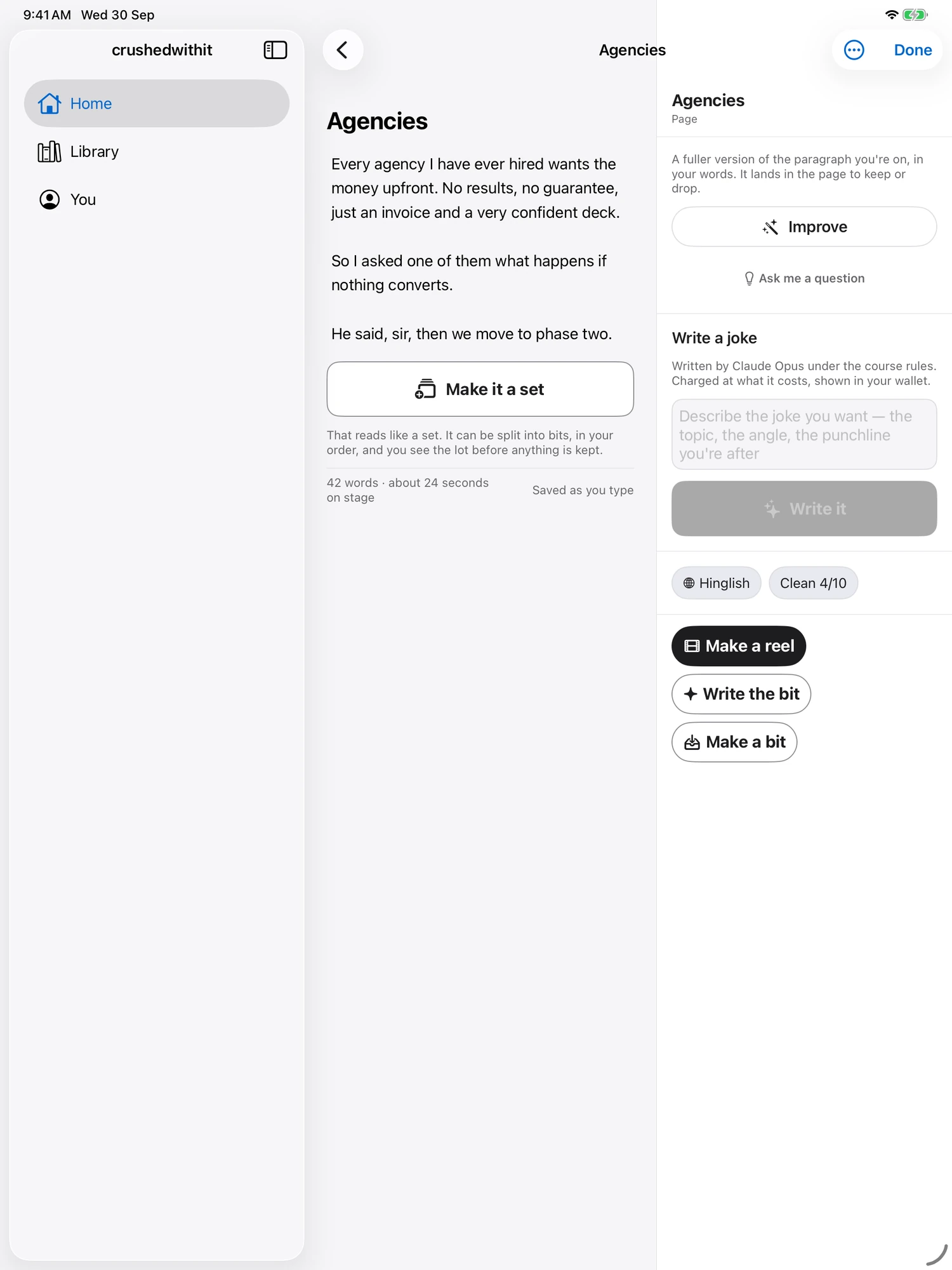
Native 13-inch iPad Writing Room · sample page.
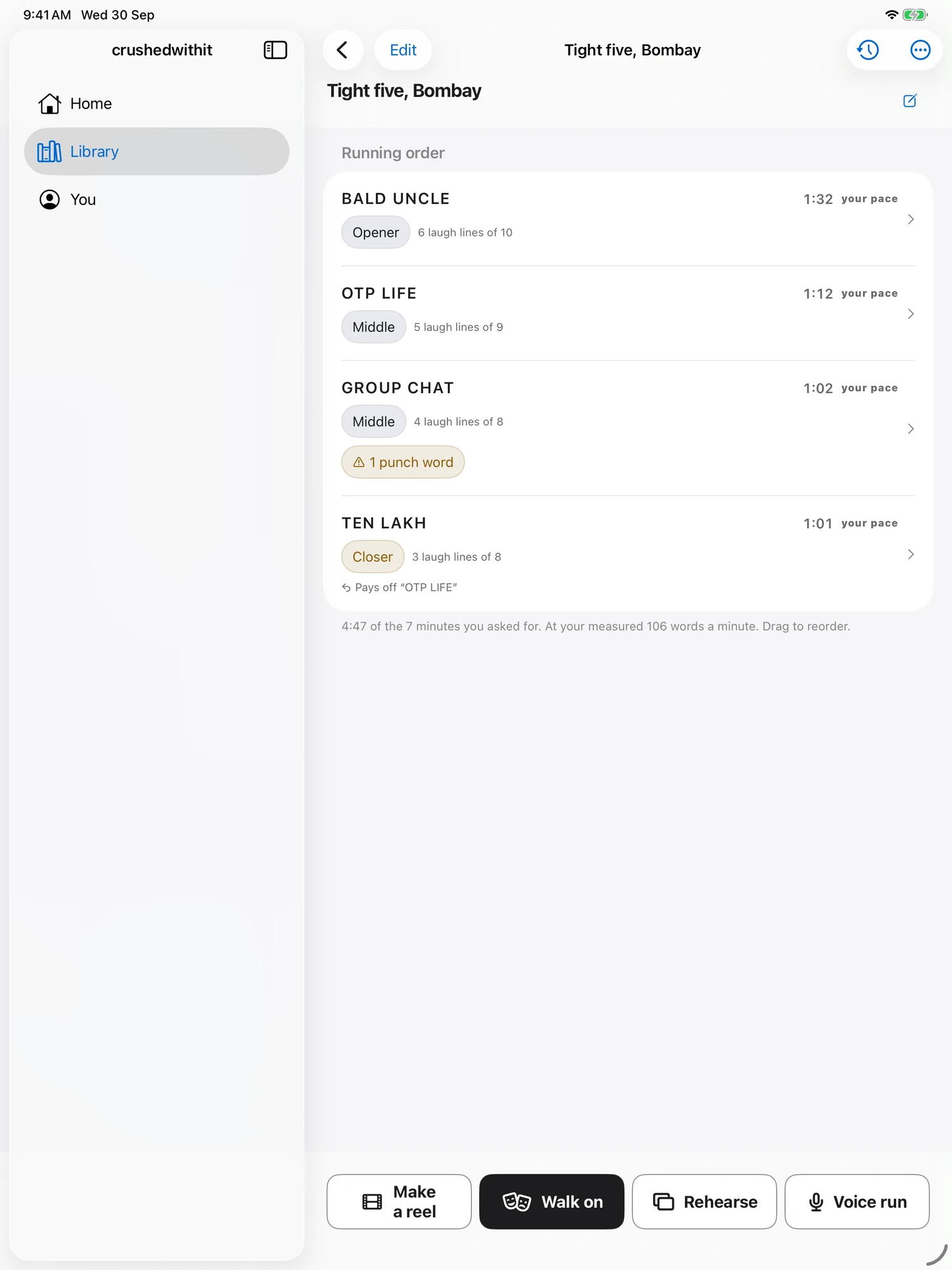
Native 13-inch iPad set editor · sample running order.
Apple Watch
A glance. A thumb. Keep going.
See the current joke’s title, punch word and light clock on your wrist. Mark a joke with a thumb. The Watch mirrors the phone’s page; it does not turn the phone’s pages.
Native Watch · OTP LIFE, joke 2 · seeded snapshot matching the phone’s sample joke.
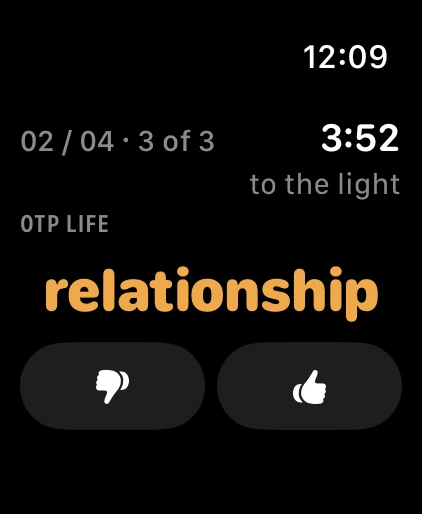
Native Watch · the next phone page, joke 3 · seeded snapshot.
All screens were captured from the native app with sample material on 30 September 2026. Screen contents and layouts vary with your device, appearance and app version.
BUILT AROUND YOUR VOICE
The way you say it
is part of the story.
Longer Personal Double videos. Edits that keep the good parts. Pronunciation tools for English, Hinglish, Hindi, Telugu, Tamil, Kannada, Marathi and Punjabi. Here’s the thinking behind the tools in our current test build.
One performance. Every part.
Turn a longer script into connected parts, watch the whole video, and remake the part that needs work. On supported parts, fix several pronunciations in one edit.
Explore video & editing ↗Written by you. Said your way.
Prepare pronunciation on your device, inspect “Said as”, and remember your corrections across your iCloud devices. Your captions keep the words you wrote.
Read our language story ↗EIGHT LANGUAGES. ALL YOU.
Your voice.
In your language.
Write and make reels in English, Hinglish, Hindi, Telugu, Tamil, Kannada, Marathi and Punjabi. Keep the local words, the familiar names, and the switch from one language to another.
THE WORDS FOR “YOUR VOICE”
Aapki voice.
Hinglish Hindi + English, together.
Different languages.
The same unmistakable you.
The same unmistakable you.
Pick a language. Make yourself at home.
See how we prepare pronunciation
Language choices for writing and reels. Speech recognition depends on your device; generated pronunciation still needs your review.
SAFE & SECURE
Your material.
Your private space.
On-device toolsYour private iCloudNo app email or phone login
Transcribe, rehearse, prepare pronunciation, film and edit on your device. Your library can sync through your private iCloud. Online writing help and Personal Double videos use separate services, with clear choices about what you send.
The website’s optional early-access form collects the contact details you enter. Using the app does not require an email address or phone number.
Explore the Trust Center ↗Three plans, one app. The difference is what costs money each time you use it.
Every plan keeps your material yours: read, edit, perform and export it, even if you stop paying. Prices are Apple's, per country, in your own currency.
Writer
—a month
- The Writing Room, and sets with reasoning under each line
- Audio notes, flashcards, the prompter, Stage mode
- Local reading, editing, rehearsal and export
Stage
—a month
- Everything in Writer, with three times the balance
- The room: recording, the Crushed Score, silences and heckles
- Your double, and reels of your bits said by it
Prices are per month. One subscription covers every device you own. The full table, every row, in your country's currency.
Requires iPhone 15 or later on iOS 26, and runs on iPadOS 26, macOS 26 and watchOS 26.
Get crushedwithit.
On the App Store for iPhone, iPad, Mac and Apple Watch. One subscription covers every device. Writer and Stage start with three days free.
Your questions. Answered.
What comics ask before they trust an app with their material. Every answer here is one the app can stand behind today; anything not built yet says so.
Getting started
What is crushedwithit?
A companion for writing, rehearsing and performing your own material. Home starts with Write, Talk and Film, keeps your progress near the top, and offers your next gig and unfinished work. Writing assistance and generated reels use online services; self-filming, trimming and captions run on your device.
What happens when I open it the first time?
You confirm you are 18 or over, meet the app and its note/bit/set/night vocabulary, then choose your language, how clean you work, stage name, what people assume about you on sight, and plan. Home then offers Write, Talk and Film.
Why does it ask whether I am 18?
Because the rooms this is for are 18+, and the app says so before it says anything else. It is a confirmation, not a date of birth — the only thing kept is the moment you tapped it.
Recording a note
How fast can I get an idea down?
Tap Talk on Home to start a voice note. Write opens an editable page, and Film opens the filming choices. Microphone permission is requested when access is first needed.
What happens to a note after I stop talking?
The app keeps the recording and transcript, and on-device analysis looks for a premise, attitude and candidate setup and punch. Crush Potential and suggestions help you decide what to develop. You can correct the transcript and use the writing actions on the saved note.
What is Crush Potential?
A 0–100 read on how close a note is to being a joke, built from seven things: a premise with an attitude on it, specificity, a mechanism you can name, where the candidate punch word sits, setup economy, room for a tag, and how original it is. It is always shown with its parts, never as a bare number.
Building your voice
Where do I start writing?
Write opens the Writing Room: one editable page that saves as you type. Start with your own idea or use Ask me a question. Improve helps develop what you have, and Write a joke takes a brief you choose. Keep working on the page, then turn your words into a bit, a set or a reel.
What if I stare at a question and nothing comes?
Ask me a question offers a starting point. Improve works on the words you have already put on the page. You review the result and decide what to keep. For a new joke, describe the topic and angle in Write a joke.
Will the writing help invent details?
The writing prompts ask for missing details instead of inventing a biography. Generated text is checked for names and places that were not in your input. These checks help, but you should still read suggestions before keeping or performing them.
Writing a set
How does it build a set?
You give it a length and a room; it plans the bits — one premise each, an opener that addresses the obvious about you, a closer that calls back to something earlier — and then writes them two at a time. Every line arrives with its reasoning and with the answer of yours it grew from.
Are these my jokes or somebody else's?
Yours. Every line is built from answers you gave and names the one it came from, and the rulebook the writing room works to forbids borrowed or viral material outright. A line that lands too close to something already in your own bank is flagged rather than kept quietly.
What if I ask for twenty minutes and I have answered six questions?
It refuses, with numbers, rather than padding: it tells you roughly how many minutes your answers support and how many more questions to answer for the slot you asked for. That check runs on the phone before anything is sent.
What if it stops halfway through writing?
The bits already written are saved and the job picks up where it stopped — a half-finished set is still performable. You can leave the app while it runs; it works in the background and tells you when the set is ready.
Can I change the running order?
Yes — reorder, cut, or swap one bit for a fresh one, and a swap rewrites that bit alone and re-checks any callback pointing at it. Every change reaches the store the moment you accept it, and earlier versions are kept.
Can I write in Hinglish, or in an Indian language?
Yes — you pick the language a set is written in, and the choice is Hinglish, English, Hindi, Telugu, Tamil, Kannada, Marathi or Punjabi. The rehearsal and the live analysis follow your punch words rather than every syllable, so a set that switches language mid-sentence still works. Dictation is the one part that depends on your device: Hinglish is transcribed with the Indian English model, so a Hindi word may come back spelled the way it sounded, and you fix it by tapping the transcript.
Editing, and the reasoning under a line
What is the reasoning under a line?
The machinery, spelled out: the mechanism the joke uses, the assumption the setup plants without saying it, the one element with two readings, the reveal that breaks it, which theory of laughter it runs on, why it should land for you, the rule of the course it obeys, and the answer of yours it came from.
Does every generated line have that, or only the good ones?
Every one, or it is not saved. A reply carrying a line without complete reasoning fails the check on the phone, goes back once with the broken rule named, and is then reported to you rather than shown.
Can I just rewrite a line myself?
Yes, everything is editable, and the editor reads along as you type. If your edit leaves the punch word somewhere other than the end it flags the rule and offers to trim whatever came after it.
What happens to a line it thinks is hack or stereotyped?
It is greyed with the reason and kept out of Stage mode until you edit it or approve it. It is not deleted and the call is still yours — the app will not take a line off you, it just will not hand you one on stage that it has doubts about.
Rehearsing
How do the flashcards work?
Choose Cue, Punch or Blackout. Say the line, tap Reveal, then mark yourself Blank, Fumbled, Shaky, Clean or Instant. The app uses those ratings to schedule what you practise again. Flashcards do not listen to or automatically grade your voice; Voice Run is a separate mode.
I am on in two hours. What should I drill?
Drill before gig builds you a session of twelve minutes or less out of the lines you have fumbled and the ones you changed most recently. It is the short list, not the whole set.
What is the voice run?
You perform the set out loud to the phone and it follows you, then reports the lines you skipped, the setups you paraphrased — which is fine — and the punch words you missed, which is not. Silence never advances it; if you stop, it holds.
On stage
What is Stage mode?
Huge type on black, one joke a page, the punch word picked out, the bit's slug pinned above it and the light timer running. The counter reads both halves — 02 / 04 · 2 of 3 is bit two of four, joke two of three — the screen stays awake, and nothing touches the network.
Does a swipe move a bit or a joke?
A swipe on the phone moves one joke. The bit title stays in place until you reach the next bit, and the counter shows both the bit and the joke within it.
Does it handle the light?
You set the light when you book the night, and the phone buzzes at one minute to go and again when you are on it, with the closer's slug turning amber. A night with no light is allowed, and it is not scored against one.
What if the app dies in the middle of my set?
Stage saves your position as you move, so the app can restore the set and joke after an interruption. Reopen the app and check the restored page before continuing; recovery time depends on the device and what interrupted it.
The venue does not allow recording. Is the app still useful?
Yes. Stage mode runs as normal and you mark each joke with a thumb yourself, and those marks merge with any automatic ones — so a night nobody recorded still gets a review.
After the show
What does recording a show actually do?
It listens for laughter, applause, silence and people talking in the room, lines what it hears up against your set by punch word, and builds a score while you are still on stage. All of it happens on the phone — nothing is streamed anywhere.
What is the Crushed Score?
A 0–100 read on the night from seven things: the share of it that was laughter, surges a minute, peak intensity, how many punch words got a laugh inside a second and a half, momentum, recovery after a line dies, and whether you got off on the light. It is always shown with the laughter share and the heatmap, never alone.
Does it rewrite my set for me after a show?
No. Suggestions arrive as diffs with the evidence attached — a tag that outperformed its own punchline, a line that died in three rooms of different sizes — and accepting one writes a new version. Nothing is ever changed silently.
What is the Show Report?
One page you can send: the score with its band, the laughter share and laughs a minute, the heat across the set list, the three biggest laughs with the lines that got them, the longest silence, and one recommendation that names the rule behind it. It renders as a vertical picture for a phone and as an A4 PDF.
How accurate is the heckle detector?
We do not publish a number for it, and we will not until it has been run against labelled recordings of real rooms. What it does is describable without one: it looks for somebody other than you talking over you, and for what you did next.
The Library
Where does everything I write end up?
In the Library: a searchable feed of notes, bits, answers, sets, shows, reels and links. Filter by kind and open a row to read, edit or act on it. On a wider screen, filters and actions live beside the content.
Can I bring in ten years of notes from somewhere else?
Yes: Apple Notes exports, Google Keep exports, plain .txt and .md dumps, and Punch Word's JSON. Everything is split, read as an answer, a premise or a joke, and shown to you before a single row is saved — and nothing is generated from it unless you ask.
iPhone, iPad, Mac and Watch
Which devices does it run on?
iPhone, iPad, Mac and Apple Watch, from one app and one subscription. Each has a job: the phone is the stage and the pocket, the iPad is the writing desk and the prompter on a stand, the Mac is the writing room, the watch is the remote on your wrist.
Why is there no Stage mode on the Mac?
Because a Mac does not go on stage, and the app says so where Stage mode would have been: stage mode and the live show run on your iPhone or iPad, which is what goes up with you. The Mac is the writing room — write it there and it is on the phone before you walk on.
What does the watch do?
The Watch mirrors the current phone page: the bit and joke counter, the light clock, the title and punch word. Tap a thumb to mark that joke. It does not turn the phone’s pages; move to the next joke on the phone.
Does my material follow me between devices?
Your material can sync through your own private iCloud database. Recordings are fetched when needed rather than copying the whole archive onto every device. Keep anything you need offline on that device first; sync depends on iCloud availability and connectivity.
What is different on the iPad?
More space for the page and its actions. At regular width, navigation and the inspector can sit beside your writing or set editor. Stage mode is available on iPad too, for a prompter on a stand.
Privacy, and your material
Where does my audio go?
Notes and show recordings are processed on your device and can sync through your private iCloud. You can also export them yourself. Self-filmed takes stay local unless you share them. Building a double and generating reels is separate: the recording and material you approve for that flow are sent to the render service, as explained before consent.
So what does leave, when something does?
Writing requests send the relevant text to our server and writing service. Making a report link uploads that PDF. Double and generated-reel requests send their approved recording and render inputs. Private iCloud sync, purchases, notifications and service operation also exchange the data needed for those features. This is not a promise that everything except writing stays offline; see the privacy page for the separate paths.
Is my material used to train anything?
We do not train models on your material. Anthropic does not train on the text sent for writing help. For video, the terms depend on the service named before you consent: BytePlus does not train on submitted material without our authorisation, which we have not given; Higgsfield’s terms permit training, which deletion cannot undo. The privacy page explains both paths.
Does it work with no signal?
Saved local material, Stage mode, flashcards, on-device recording and analysis, and self-filming do not need an online writing service. Some device capabilities and permissions still matter. Writing new material, making a double or generated reel, fetching a file that is not on this device, private iCloud sync, purchases and hosted report links need connectivity. Keep the files you need locally before going offline.
Can I take everything out, or delete all of it?
Both, from the You tab. Export everything writes a zip of your records and every audio file. Delete everything asks you to take that copy first, then removes your material from this device, your iCloud and our server, and takes down your Show Report links. It does not cancel your subscription, and unspent reload credit goes with it. Take down any live Private Mic link first; the privacy page lists exactly what goes.
Who can see a Private Mic link?
Anyone with the link can view it until it expires after seven days or you take it down. The page shows the shared reel rather than your Library, and viewers can leave the requested reaction without an account. Treat the link as shareable: someone can forward it. The privacy page explains the limited operational and abuse-prevention data; report a concern on the page or to sachin@getconvi.com.
How long are recordings kept?
Ninety days by default, and the window is yours to change — including keeping them until you delete them yourself. The purge covers show recordings and note audio alike, and it runs at launch.
Plans and billing
What are the plans?
Three monthly plans cover iPhone, iPad, Mac and Watch. Writer covers writing help and your material, including sets, flashcards and Stage mode. Stage adds Voice Run, live show analysis, coaching, hosted Show Reports and paid double/reel creation. Ultra adds a larger monthly credit balance. The pricing page has the full feature table and current App Store prices for your country.
What happens to my material if I stop paying?
You keep it — reading, editing, exporting, Stage mode and flashcards all stay open, on everything you have already written. Only writing new material, analysis and coaching pause. There is a test that fails the build if that ever stops being true.
Is there a limit on how many sets I can write?
No — the plans meter what the writing actually costs rather than counting sets, so you write as much as you like until the month's credit is used and it says out of credits. On a paid plan it refills on its own, and nothing you have already written is affected either way.
Do reloads expire?
No. A reload is a one-off purchase that adds credit when the month's balance runs out, and that credit never expires. It is spent only after the month's own balance, oldest first. The monthly balance itself resets each month.
Is there a free tier?
No. Writer and Stage start with a three-day free trial for new subscribers; Ultra has no trial. The trial covers the writing and the room, not the double or reels. Nothing is charged until it ends, and cancelling at least a day before it ends means nothing is charged at all.
Filming & reels
Can I film myself with it?
Yes. Choose Film yourself for the voice-paced prompter, saved takes, trimming, captions and export on your device. You do not need a double or render credits. Takes stay local; a clip you keep can sync through private iCloud. Automatically cutting the biggest laughs from an imported full show is still planned.
Can my Personal Double make a longer video?
Yes. A longer script is split into connected parts. The progress screen shows each part as it is made; when ready, you can watch the whole video or open a part. You review the quote before rendering, and generation needs an internet connection and credits.
Can I fix one part and keep the rest?
Yes. Open the part that needs work, review the proposed change and its cost, then make a new take of that part. Compare the takes and choose which to use. Supported pronunciation edits can address several words together; available changes depend on the part and provider.
Can I check how my words will be pronounced?
The script tools distinguish your written words from Said as, the pronunciation sent for speech. Review the spoken form and keep your corrections. Language tools cover English, Hinglish, Hindi, Telugu, Tamil, Kannada, Marathi and Punjabi; generation quality varies by language and provider. Your captions keep the written words.
What can I review before making a reel?
Review your script, pronunciation, appearance, scene, framing, captions and the quoted cost. A Personal Double uses a reference recording you consent to upload. Rendering is separate from the on-device preparation tools; your choices determine the material sent.
What is coming
Does it work with smart glasses?
You can export a set as teleprompter cards today — one card per bit, on your clipboard, ready to paste into the Meta app and page through. Connecting to glasses directly, so the app drives the cards itself, is coming soon.
FOR PROFESSIONALS · CRUSHEDWITHIT STUDIO
Your expertise.
A presence that keeps up.
Your own Video Double, human editing and a monthly content plan. For founders, consultants, doctors and professionals with something useful to share.
Explore Studio plans ↗4 / 8 / 12videos per month · up to 2 minutes eachFrom ₹49,999 ₹29,999per month, plus applicable taxes · 40% off until 30 October 2026
Capped editor hours. Your final approval.
Capped editor hours. Your final approval.
Find your next step.
Start on the web.
Write, rehearse and make reels in your browser.